Point Load                                                                                                                                                                              

Apply concentrated loads or moment at each end of line menber(1D).

¢Æ Call

New

[Load] Tab > [General] > [Point Load]

Work Tree [Analysis] Tab > [Static Load] > Right-Click > [Add Point Load]

Modify, Delete

Work Tree [Analysis] Tab > [Static Load] > [Dead Load] > [Static Load Set] > [Point Load] > [List] > Right-Click > [Modify], [Delete]


¢Æ Detail Description

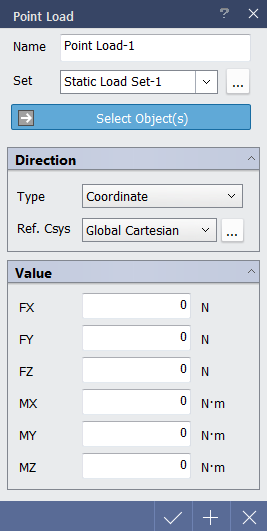
< Point Load Dialog >

Name : Enter the name of load case to be created.

Set : Select a static load set in which the specified load is included. Static load set dialog can be accessed through button.

Select Object(s) : Select object to apply loads.

Selectable Object(s) : Point of line member.

Direction

Select the direction of loads to be applied.

Coordinate : Apply load with respect to selected coordinate system.

Ref. Csys : Select the coordinate system which becomes the reference of the load components. Coordinate System dialog can be accessed with button.

Ref. Line/Edge : Apply load in x-direction of selected reference line/edge.

Select Object(s) : Select reference line.

Selectable Object(s) : Line member, line body, line of surface member, line of solid member, line of body.

Ref. Surface : Apply load in direction of axial direction of reference surface.

Select Object(s) : Select reference surface.

Selectable Object(s) : Surface of member and body.

Vector : Entered load will be applied automatically in vector direction.

Value

Enter the values.

FX : GCS X-direction component of concentrated load.

FY : GCS Y-direction component of concentrated load.

FZ : GCS Z-direction component of concentrated load.

MX : GCS X-direction component of concentrated moment.

MY : GCS Y-direction component of concentrated moment.

MZ : GCS Z-direction component of concentrated moment.