Self Weight                                                                                                                                                                             

Apply self weight of all members in the model as loads.


¢Æ Call

New

[Load] Tab > [General] > [Self Weight]

Work Tree [Analysis] Tab > [Static Load] > Right-Click > [Add Self Weight]

Modify, Delete

Work Tree [Analysis] Tab > [Static Load] > [Dead Load] > [Static Load Set] > [Self Weight] > [List] > Right-Click > [Modify], [Delete]


¢Æ Detail Description

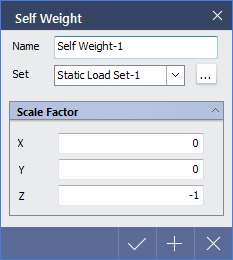
< Self Weight Dialog >

Name : Enter the name of load case to be created.

Set : Select a static load set in which the specified load is included. Static load set dialog can be accessed through button.

Scale Factor

X : Self weight factor in the GCS X-direction

Y : Self weight factor in the GCS Y-direction

Z : Self weight factor in the GCS Z-direction