PDMS Import

Import PDMS neutral file as midas nGen file.


ΆΖ Call

[Interface] Tab > [3D CAD Program] > [PDMS] > [Import]


ΆΖ Detail Description

PDMS Import is a function which can import modified(delete, edit, add) file of PDMS which was previously exported from midas nGen.

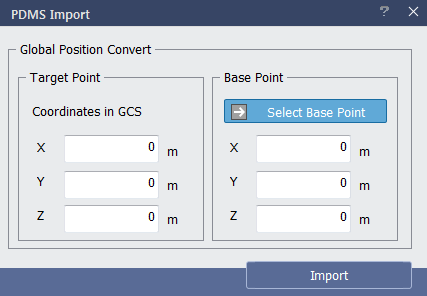
< PDMS Import Dialog >

Define the base point midas nGen where the target point of PDMS file to be imported.


Target Point : Define the target point of PDMS file.

Base Point : Define the coordinates of midas nGen to import target point of PDS. Base point can be selected from model view or defined manually.


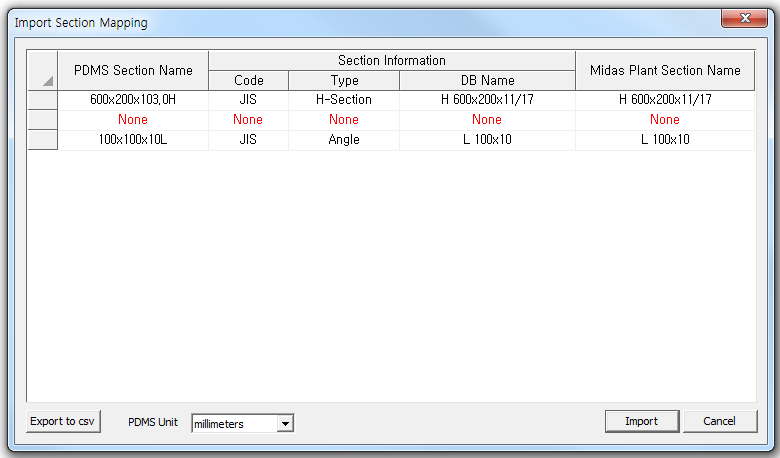
Click 'Import' to access the dialog to open PDMS Neutral File (*.mac). When the file is opened, section properties of imported file can be edited in Import Section Mapping dialog.


< Import Section Mapping Dialog >

Table

PDMS Section Name : Section name defined in PDMS file.

Section Information

Code : Section Code defined in PDMS file. If not defined, it is expressed as None.

Type : Section Type defined in PDMS file. If not defined, it is expressed as None.

DB Name : Section DB Name defined in PDMS file. If not defined, it is expressed as None.

midas nGen Section Name : Define Section Name to be used in midas nGen. It is possible to select and modify section list created in midas nGen.

Other Functions

Export to csv : Export the information in Import Section Mapping dialog to excel file(*.CSV).

PDMS Unit : Select Unit of PDMS file to be imported.

Import : After modification, import PDMS neutral file.

Cancel : Cancel import.