Isolated Footing
Create Isolated Footing(2D),
Create an isolated footing supported by soil or pile. It is automatically assigned to the “Basement” member set, and can be designed by FEA Method and Rigid Method. It is classified as an Isolated Footing member in drawings and reports, and the default cover is 80mm. When placing piles, the user can change the cover thickness if required..
▒ Call
 New New
[Member] > [Basement] > [Isolated Footing] Delete
Work Tree [Model] Tab > [Member] > [Member Set] > [Isolated Footing] > [List] > Right-click > [Delete] |
▒ Detail Description
3D Modeling Mode |
[Isolated Footing GUI]
 Member Set :
Select
Member Set. Default set of isolated footing is “Basement”.
Story Set :
Select
Story
Set. Member Set :
Select
Member Set. Default set of isolated footing is “Basement”.
Story Set :
Select
Story
Set.
- FEA Method : FEA Design Method. Footing is created using plate elements of the ‘Out of Plane’ type. - Rigid Method : Rigid Design Method. Footing is not considered in an analysis, and a point spring is assigned to the bottom of column automatically. Footing design is checked by reaction value of the point spring.
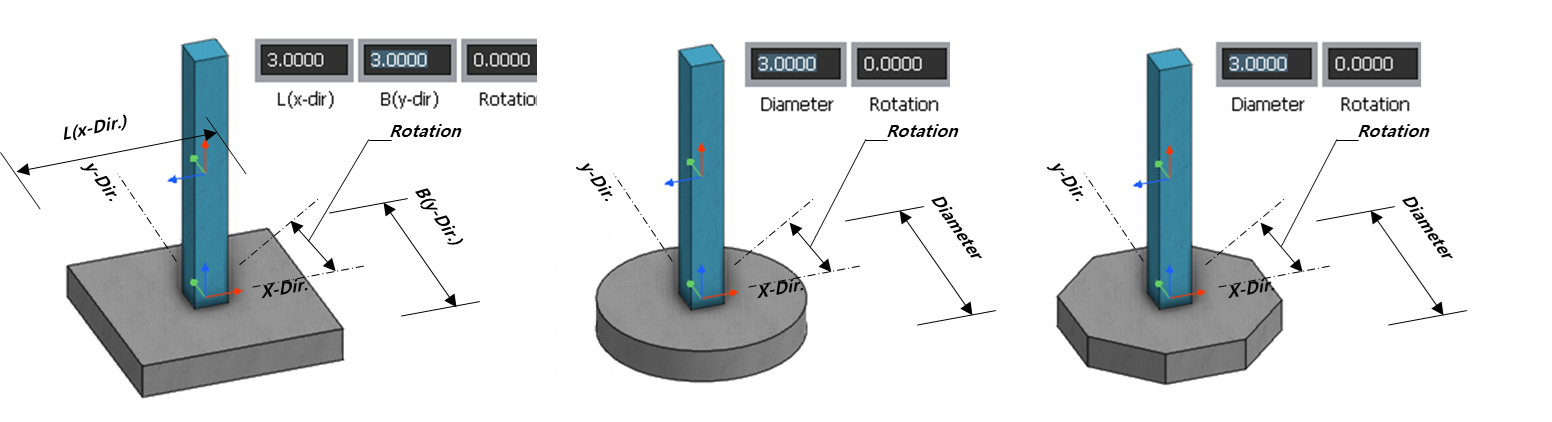
[Rectangle] Type [Circle] Type [Octagon] type
[User Define] Type : Generate a footing by selecting points or by entering a coordinate.
* Note The rebar direction would be along the local axis of the footing So, enter the rebar information after checking the local axis of footing.
|

|
