▒
Overview
 Set the
option for the analysis control. The selection will be
saved in the individual model file. Set the
option for the analysis control. The selection will be
saved in the individual model file.
|
▒
Methodology
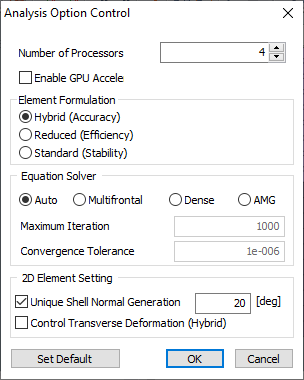
Number of processors : Specify the number
of CPUs used for analysis. For a dual core
CPU, input 2 processors and for a quad core
CPU, input 4 processors to increase the analysis
speed. Element Formulation : Specify the formula
applied to the element.
In terms of speed, a faster solution can be
obtained in order of Reduced (Efficiency)
> Standard (Stability) > Hybrid (Accuracy).
In terms of accuracy, a more accurate solution
can be obtained in order of Hybrid (Accuracy)
> Reduced (Efficiency) > Standard (Stability). Equation Solver (Structural) : Specify
the method for solving a finite element simultaneous
equation. If the setting is automatic, the
program automatically determines one of the
following methods: Multi-frontal, Dense matrix
or AMG (Algebraic Multi-Grid). 2D Element Setting (Structure) : The
[Unique Shell Normal Generation] function
judges two adjacent shell elements to have
two different normal directions when the value
between the normal direction vectors are larger
than the input value. Because the element
size is relatively larger than the curvature,
if this value is increased for a rough curved
mesh, a smooth contour that considers the
curvature of the geometry shape can be calculated.
The [Consider Drilling DOF (degree of freedom)]
option calculates the stiffness of the in-plane
deformation by considering the rotation about
the out-plane axis (drilling degree of freedom). |
|

|
|

