Rebar-Arc Pattern
Place the rebars on a circular arc drawn in the model window.
From the Main Menu select Model > Rebar > Rebar-Arc Pattern.
Right Click  and Select Add under the Section > Main Reinforcement in the Works Tree.
Click  Arc Pattern in the Icon Menu.
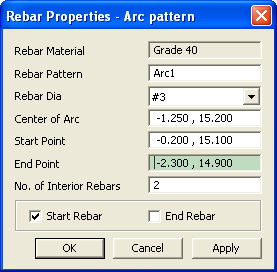
Rebar-Arc Pattern
 Rebar Material
The material defined by the user in Model>Rebar>Rebar Material Property is assigned to all the rebars.
Rebar Pattern
Name of the pattern.
Rebar Dia
Select the rebar diameter from the drop down list. The rebar set is as per the country code specified in Model>Rebar>Rebar Material Property.
 Center of Arc
Enter the center of the arc.
Start Point
Enter the start point of the arc.
End Point
Enter the end point of the arc.
No. of Interior Rebars
Enter the number of rebars in the interior of the arc, i.e. excluding the rebars at the start point and the end point of the arc.
Start Rebar
Check on to place a rebar on the Start Point of the arc.
End Rebar
Check on to place a rebar on the End Point of the arc.
Note1
The preview is shown in the work window before applying.
Note2
To place the rebars along the complete circle, use Arc pattern twice (placing rebars around the semicircle at a time) or Perimeter Pattern