Model: Layer Modeling

Function
Enters the time history load for the seismic analysis of the ground
Call
1D Equivalent Linear Analysis Module : Model > Layer Modeling...
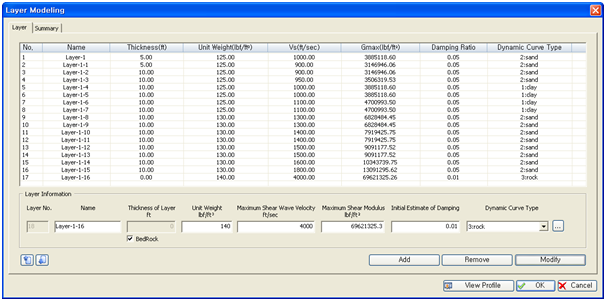
<Layer Modeling>
Layer Information
The material parameters for each layer can be entered in the Layer Information.
Layer No.
Layer numbers are in order sequence and automatically generates the number one as the default layer no.
Name
Enter layer name.
Thickness of Layer
Enter the thickness of layer. When Bedrock is selected, the entry window deactivates.
Unit Weight
Enter the unit weight of layer.
Maximum Shear Modulus (Gmax)
Enter maximum shear modulus of elasticity.
Initial Estimate of Damping
Enter the initial damping ratio of ground.
Maximum Shear Wave Velocity (Vs)
Enter the shear wave velocity of ground.
Dynamic Curve Type
Click
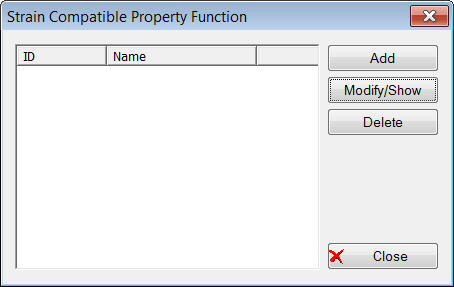
 button to consider the nonlinear and inelastic behavior. A
"Strain Compatible Property Function" will be displayed.
button to consider the nonlinear and inelastic behavior. A
"Strain Compatible Property Function" will be displayed.
(Please refer to the Shear Strain Function "Dynamic Curve Type")
Add
Add layer
Remove
Remove the created layer
Copy
Copy the created layer
View Profile
Check the profile of the layer
The entered layer list on the upper left side of the window may be viewed, and selecting a layer will show the layer information. Click the
 button after the layer information has been
modified to save the information.
button after the layer information has been
modified to save the information.
Any layer can be chosen from the layer list to copy or delete, and

 buttons can be used to change the order of the layer.