File: Project Setting

Function
The project setting dialog box sets basic information of project. Project setting must be set correctly beacuse position of the model and constraint will be affected. Project setting is strongly recommended a pre-set at the start of a new project, but you can safely change the settings during modeling.
Call
Main Menu : file > Project setting...
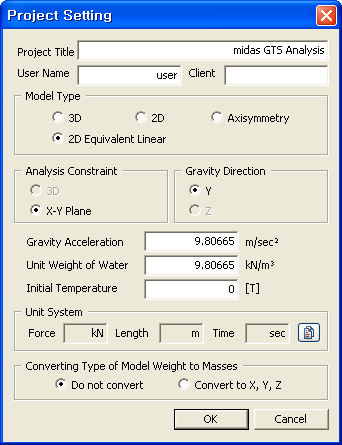
<Project Setting>
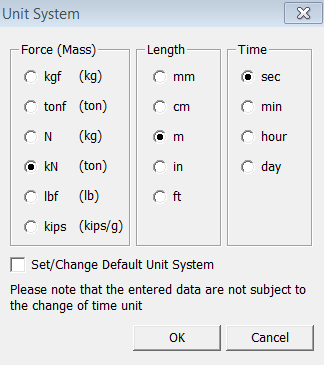
<Unit System>
|
Project Title Enter the title of the current Project.
|
|
User Name Enter the name of the current user.
|
|
Client Enter the name of Client/Contractor.
|
|
Model Type
3D Gravity direction: Z-axis. 2D Gravity direction: Y-axis. Axisymmetry Gravity direction: Y-axis. 2D Equivalent Linear Gravity direction: Y-axis.
|
|
Analysis Constraints
3D Three dimensional
analysis constraint will be applied for 3D model . Analysis constraint
for X-Y Plane
model will be applied. Analysis constraint
for X-Z Plane
model will be applied. Analysis constraint for Y-Z Plane model will be applied.
|
|
Gravity Direction Select the direction of gravitational load.
|
|
Gravity Acceleration Enter the value of gravity acceleration. (Default value : 9.80665 m/sec^2)
|
|
unit Weight of Water Enter the value of unit weight of water. (Default value : 1 tonf/m^3)
|
|
Initial Temperature Enter the value of initial temperature. (Default value 0 [T])
|
|
Select the unit system
of the project. Clicking
|
|
Converting Type of Model Weight to Masses Do not convert This option does
not convert model weight to mass. This option converts model weight to mass to consider in dynamic analysis. |
 button opens a Unit System
dialog box with a list of Force, Length, and Time units.
button opens a Unit System
dialog box with a list of Force, Length, and Time units.