View: Display Option-General

Function
Specify options for general display.
Call
View
> Display Option 
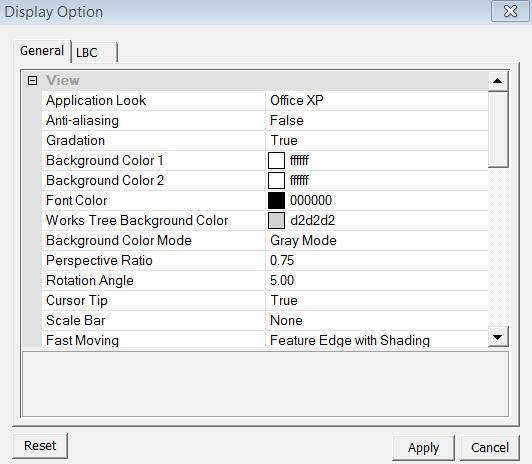
<Display Option - General>
View
Application Look
Select GTS Window
Style. It offers 4 application styles, OFFICE 2000, OFFICE XP, VS.NET
2005, and OFFICE 2003.
Anti-Aliasing
Use Anti Aliasing
displaying method.
Gradation
Use gradation in
Work Window background. If true, the background will have two color (Background
Color1 and Background Color 2). If false, only Background Color 1 will
be used as background.
Background Color 1
Select Background
Color 1.
Background Color 2
Select Background
Color 2.
Works Tree Background Color
Select Works Tree background color.
Background Color Mode
Select background colors from the 5 preset modes (White Mode, Black Mode, Blue Mode, Green Mode, and Red Mode).
Perspective View Ratio
Specify the Perspective
View Ratio which determines the viewing distance during Perspective Mode. It must be entered between 0 and 1, and as it closer
to 1, the objects appears closer.
Mode. It must be entered between 0 and 1, and as it closer
to 1, the objects appears closer.
Rotation Ratio
Specify the rotating
angle for Rotate


 view function.
Cursor Tip
Displays the Cursor
Tip which shows the current Selection Filter at the tip of mouse pointer.
Grid
Grid Color
Select Grid color.
Width
Select Grid line
width.
Line Type
Select Grid line
type. GTS offers 4 line types, Solid, Dash, Dot, and Dot-Dash.
Shape Color
Specify default colors
of geometric Shape.
Mesh
Display Mode
Select default display
mode of Mesh. It offers Wireframe, Shading, and Feature Edge.
Node Display
Select default node
display color.
Feature Edge Angle
Enter the Feature Edge Angle.
Label Hide
Specify whether to display labels such as boundary condition, load, and ID numbers.