Transform: Mirror Shape

Function
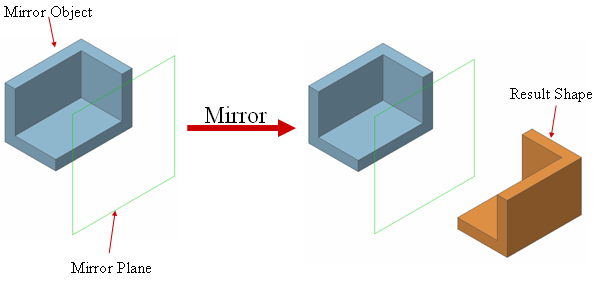
Mirror selected shapes irrespective of their shapes. The original objects may or may not be kept while creating new copied objects.
Call
Geometry > Transform >
Mirror 
Select Objet Shape(s)
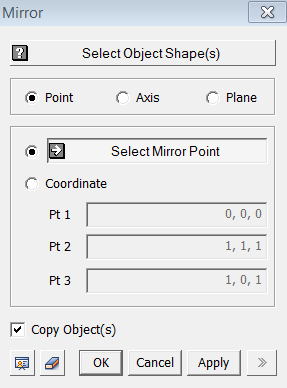
Select objects to be mirrored.
Point
Mirror selected objects about a point.
Select Mirror Point
Select a Mirror Point (Vertex).
Coordinate
Enter the coordinates of a Mirror Point. It can be specified using Snap.
Axis
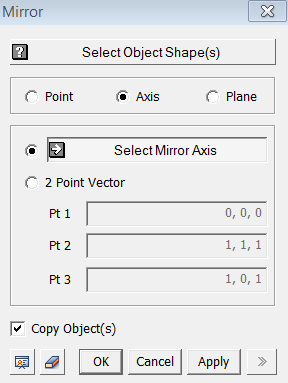
Mirror selected objects about an Axis.
Select Mirror Axis
Select a Mirror Axis (Datum
Axis, Datum Plane, Face, Edge).
2 Point Vector
Select a Mirror Axis by a vector which is defined by two specified points. The coordinates of 2 points may be specified using Snap.
<Mirror>
Plane
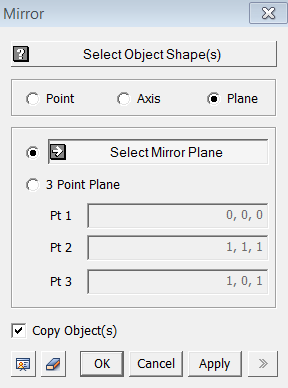
Mirror selected objects about a Plane.
Select Mirror Plane
Select a Mirror Plane (Datum
Plane, Face, Edge).
3 Point Plane
3-Pt Plane defines an infinite plane, by
which objects will be mirrored. The
coordinates of the 3 points may be specified using Snap.
Copy Object(s)
The selected objects remain intact and new mirrored objects will be created.