Map Mesh: 4 Node Area

Function
Four nodes are consecutively selected, and 4 Node Area generates a 2D mapped mesh in between the selected nodes.
Call
Mesh > Map Mesh > 4-Node Area
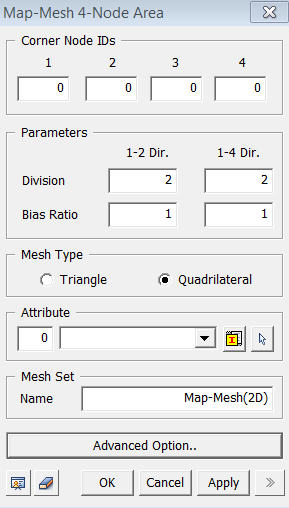
<Map-Mesh 4-Node Area>
Corner Node IDs
Select
4 Corner Node ID numbers clockwise or counterclockwise consecutively.
1
Select
the first Node ID.
2
Select
the second Node ID.
3
Select
the third Node ID.
4
Select
the fourth Node ID.
Parameters
Division
Specify
the numbers of elements to be created between the selected nodes.
1-2 Dir
Number of elements to be created between Nodes 1 and 2.
1-4 Dir
Number
of elements to be created between Nodes 1 and 4.
Bias Ratio
1-2 Dir
Size ratio of the first element to the last element along the nodes 1-2.
1-4 Dir
Size
ratio of the first element to the last element along the Nodes 1-4.
Mesh Type
Triangle
Triangle
elements are generated.
Quadrilateral
Quadrilateral
elements are generated.
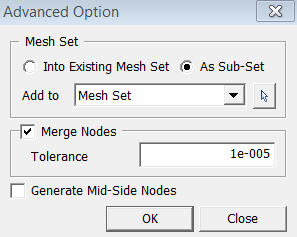
<Advanced Option>