Load: Prestress

Function
Enter the prestress for Beam and Truss elements as force and for Plane Strain, Axisymmetry, and Solid elements as stress.
Call
Model > Load >
Prestress 
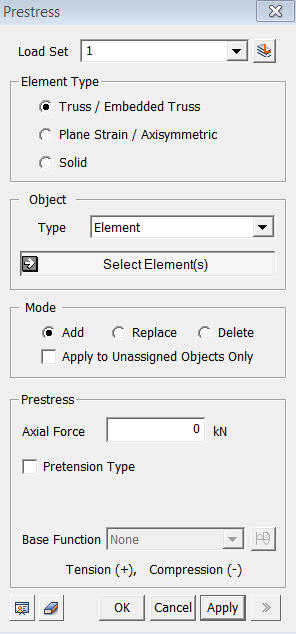
<Prestress>
Load Set
Select
a Load Set in which the specified load is included
Click  to the right to prompt the Define Load Set dialog box to add,
modify or delete the Load Set. If the user types the name of the Load
Set directly in the entry box, GTS will automatically create the relevant
Load Set.
to the right to prompt the Define Load Set dialog box to add,
modify or delete the Load Set. If the user types the name of the Load
Set directly in the entry box, GTS will automatically create the relevant
Load Set.
Element Type
Select
the type of element for which the Prestress is to be specified.
Object
Type
Select a method for selecting a part where the loads will be assigned.
Element
Select elements directly.
Curve
Select
Curves on which the loads will be applied.
(For Beam/Truss/Embedded Truss)
Surface
Select
Surfaces on which the loads will be applied.
(For Strain/Axisymmetry)
Mode
Add
Add new loads to the selected nodes
Replace
Replace previously defined loads on the selected nodes
Delete
Delete previously defined loads on the selected nodes
Apply to Unassigned Objects Only
When adding new loads, this option applies loads
only to the unassigned nodes.
Prestress
Elements must be
For Beam/Truss/Embedded Truss
Axial
Enter the prestress
axial force.
For Plane Strain/Axisymmetry/Solid
Sig-xx
Enter the prestress value in the ECS x-direction.
Sig-yy
Enter the prestress value in the ECS y-direction.
Sig-zz
Enter the prestress value in the ECS z-direction.
Pretension Type
This
option prevents any prestress loss from occurring.
Base Function
Base Functions can be applied to Element Types
of Plane Strain/Axisymmetric and Solids.
Do not make displacement
Removes an