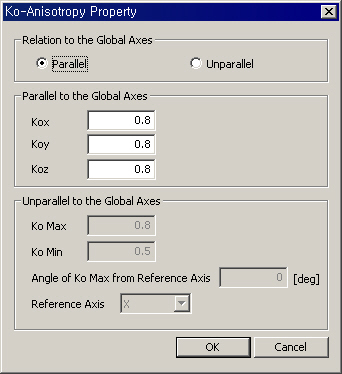
<Ko-Anisotropy Property dialog box>
Relation to the Global Axes
Parallel
Unparallel
Parallel to the Global Axis
Kox
Koy
Koz
Unparallel to the Global Axis
Ko Max
Ko Min
Angle of Ko Max from Reference Axis
Reference Axis
Property: Material |
| ||
|---|---|---|---|
|
|
|
|
|
Function |
Define the material properties of structures and ground. |
||
|
|
|
|
|
Call |
Model
> Property > Material |
||
|
|
|
|
|
|
For new or additional Material, click
<Material>
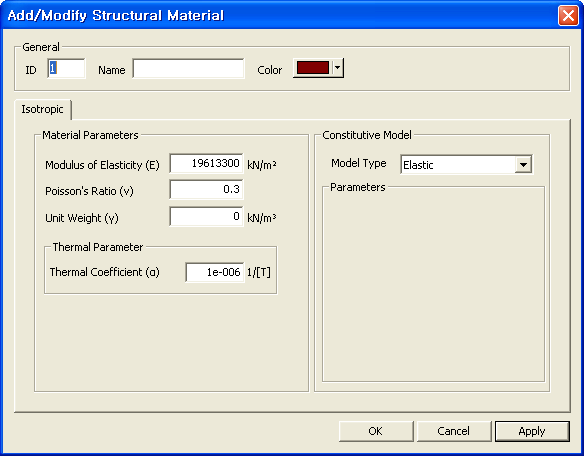
<Add/Modify Structural Material>
General ID Material property number. Material property name. Select the color of Material property. Material Parameter Modulus of Elasticity Enter the elastic modulus of material. Enter the poisson's ratio of material. Enter the unit Weight of material.
The
dialog boxes, where material properties are defined by the user, used
to be activated with default values. GTS automatically
inactivates unnecessary parameters of each material model for analysis.
For example, properties in the elastic model, such as cohesion and internal
friction angle, which are not used for calculation, are inactivated.
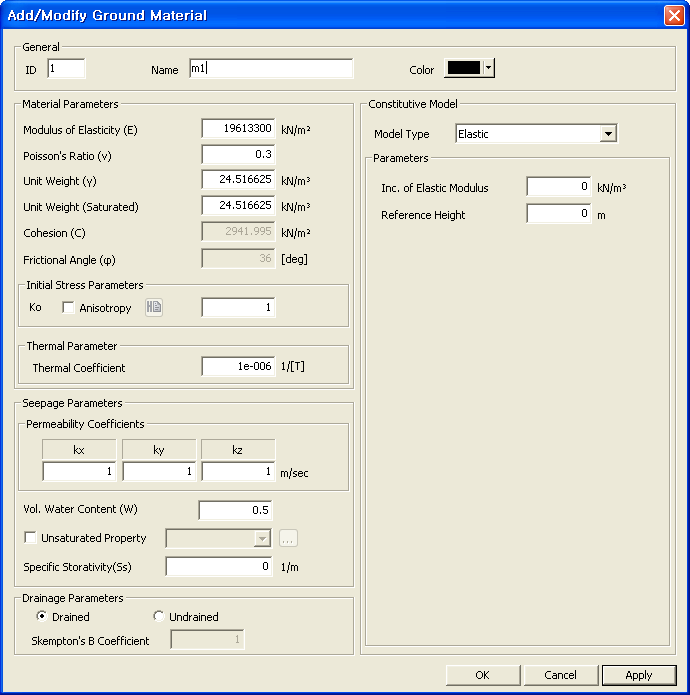
<Add/Modify Ground Material>
General ID Material property number. Material property name. Select the color of Material property. Material Parameter Modulus of Elasticity Enter the Modulus of Elasticity. Poisson's ratio is used to calculate the
Shear Modulus of Elasticity Enter the unit weight of ground material. Enter the unit weight of ground material
after saturation. Enter the cohesion parameter. Enter the frictional angle of ground material. Initial Stress Parameter If Anisotropy is not checked Ko : Coefficient
of Earth Pressure at Rest Seepage Parameter Permeability Coefficient Enter Permeability Coefficient in each
direction. Enter the volumetric water content. Unsaturated Property This option defines permeability function
and water content function which are used in the unsaturated seepage analysis.
If no function has been defined, click Drainage Parameter
Drained Check on to consider drained condition. Check on to consider undrained condition.
Note: In order to fully activate an undrained condition, this option must also be activated in "Define Construction stage." Refer to Define Construction Stage.
Skempton's B Coefficient Input parameter for Skempton's B Coefficient. Constitutive Model Select ground material model. MIDAS/GTS
provides the following 13 material models. Please refer to Analysis Manual
for detail information. To modify previously entered Material data,
select the Material to be modified in the list of the Material dialog
box and click To remove previously entered Material data,
select the Material to be deleted in the list of the Material dialog box
and click To copy previously entered Material data,
select the Material to be copied in the list of the Material dialog box
and click To import previously entered Material data
from another GTB file, click
<Import Material>
Material List Display Material data contained in the existing
*.GTB file. Selected List Select Material data to be imported and
register the data in the Selected List. Numbering Type of Material Specify the Import mode for material property numbers. Keep ID Import the data keeping the same material
property numbers. Assign new numbers to the imported material property data. To modify previously
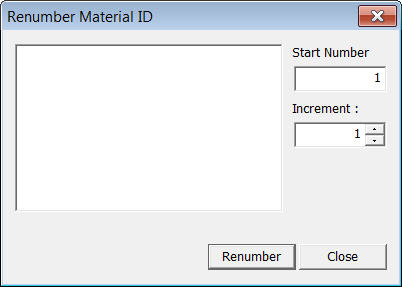
entered material property numbers, Select Material numbers to be renumbered
from the list in the Material dialog box and modify the related data followed
by clicking
<Renumbering Material>
Start number Assign a new starting number for Material
to be modified. Increment number Enter the increment for numbering Material
numbers. Change element's material number Modify a material property number. Using this option will modify the previously defined material property number. If this option is not checked, the selected material having previously defined number will become undefined and the additional user-defined material number will be created without any assigned elements. |
|||
|
|
|
|
|


 in the Properties dialog box and select Structure for structural
material or Ground for ground material.
in the Properties dialog box and select Structure for structural
material or Ground for ground material.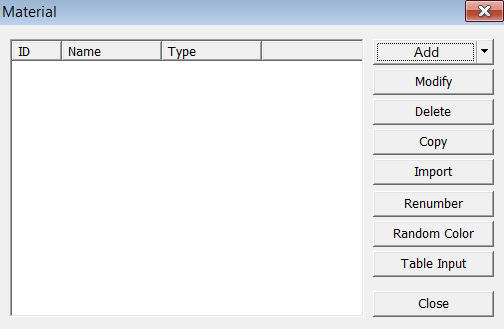
.jpg) button to add a new unsaturated property function.
button to add a new unsaturated property function..jpg) to modify the related data.
to modify the related data..jpg) .
. .
..jpg) and select the GTB file containing
Material data or specify a file name and then click Open button.
and select the GTB file containing
Material data or specify a file name and then click Open button.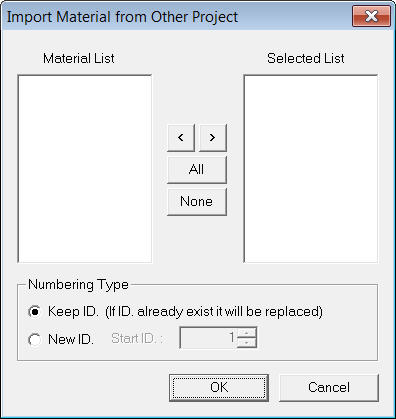
 .
.