Offset


Overview

IMG_C_ICON_DOT.gifCreate a shell by offsetting the whole or parts of a solid or shell.
 

Methodology

Whole shape


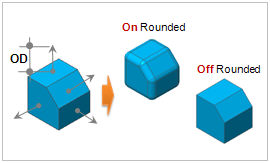
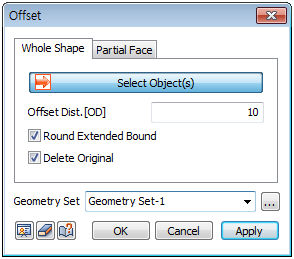
Offset all the shapes (Solid, Shell, Face) of the selected object by the same distance (Offset Distance (OD)).

Check the [Round Extended Bound] to connect any disconnected offset faces of the object using curved faces. The offset distance (OD) is the radius used for the fillet.

Check the [Delete original] to remove all target objects used in the offset process, leaving only the final shape.

Partial Face

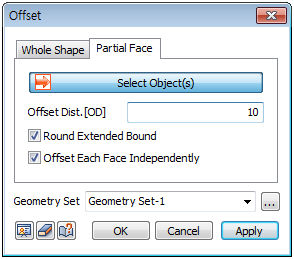
Offset parts of the selected object.

Check the [Offset Each Face independently] to offset each face separately. Un-checking this option and selecting multiple connected faces creates a shell type offset face.


IMG_C_ICON_NOTE_01.png

When offsetting only some shells of a compound shape from the select face tab, the faces diverge when offset.

Entering a positive offset distance, the offset is performed in the normal direction to the face. So when offsetting individual faces separately, it is good to use the preview function for each face to check whether it has been offset properly. If the shell has been created by joining or connecting faces, the program adjusts the different normal directions into one direction to ease the operation.

