|
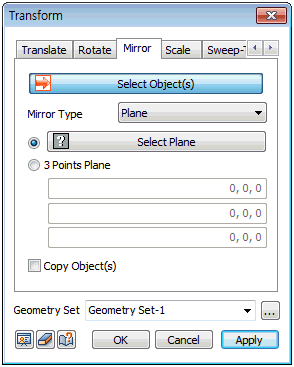
Select the shape to mirror and specify the mirror type.
The mirror type can be defined by [Point], [Axis] and [Plane].
[Point] type : Mirror the selected point with reference to a point. The mirrored point can be selected directly by clicking on the work screen or checking the coordinate system option and entering the coordinates.
[Axis] type : Mirror the selected axis with reference to an axis. The mirror axis can be selected directly by clicking on the work screen or checking the Two-point vector option and entering the Start and End point coordinates of the direction vector.
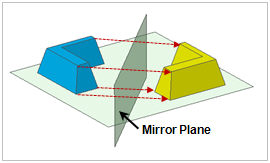
[Plane] type : Mirror the selected plane with reference to a plane. The mirror plane can be selected directly by clicking on the work screen or checking the Three-point plane option and entering the three coordinates to define an infinite plane.
Geometry set
Register the geometry shape created from the mirror command on the Geometry set. The user can specify the name of the Geometry set.
|


 Move the target object. This command can be applied regardless of the type of shape and the [Copy] option can be used to leave the original object and only move the copied object.