|
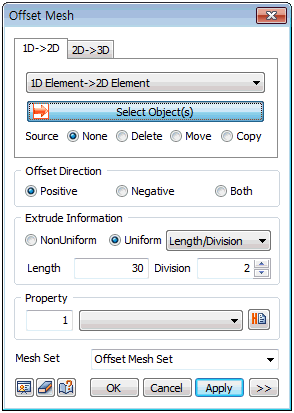
Select the 1D element, element side or seeded line (edge) to be extruded and directly select the offset direction, extrude length and number of element divisions. The element can be created by extruding in 1 direction or 2 directions. The original element (1D) used in extrude can be deleted/moved/copied. For move, the used element is moved to the end of the extruded element.
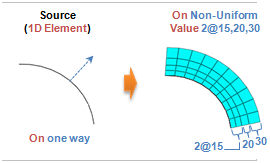 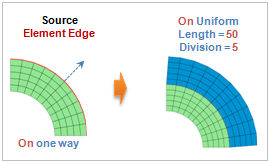
<1D element->2D Offset extrude> <Element edge->2D Offset extrude>
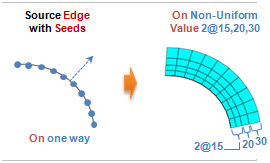
<Geometry edge->2D Offset extrude>
Offset Direction
Set the extrude direction in the selected object [Positive] direction (normal direction), [Negetive] direction (opposite normal direction), or in both directions.
Extrude Information
Set the total width and division of 2D element will be created. The division spacing can be uniform or non-uniform. Entering a negative value for length (offset, spacing) extrudes in the opposite direction to the axis or vector direction.
[Non-uniform]
Specify the offset length and number simultaneously. The length can be listed using a comma (,) or as number@length for continuously repeating extrude operations.
For example, entering 10@3 creates 10 elements with a length of 3 each and entering 2,3,4 creates 3 elements, each with a length of 2,3 and 4.
[Uniform]
Set the offset length or number, or input the total length and division spacing.
The shape of the 2D element can be selected from a triangle or a quadrilateral in advanced options (  ). ).
|


 Generate a 2D element by offset extruding a 1D element, element side or line (edge). Here, the used edge needs to be seeded (have seed information) or needs to be connected to the mesh.