Function
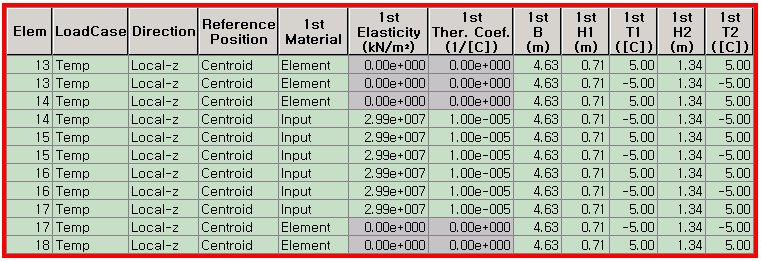
Temperature variations across the sections of beam elements are listed in a spreadsheet format table. The values may be entered or modified.
Table Tool in MIDAS/Gen offers a variety of powerful built-in functions. Refer to the following items for detail directions:
Basic directions (Cell motion, selection, size control, etc.)
Data manipulation (Add, delete, modify data, etc.)
Copy/Paste data using clipboard
Supplementary functions by Table types
Call
From the Main Menu select Load > Load Tables > Beam Section Temperatures.
Select Structure Tables > Static Loads > Beam Section Temperatures in the Tables tab of the Tree Menu.
Entry (Refer to "Beam Section Temperatures")
Refer to Usage
of Table Tool and enter or modify the following data:
Elem: Element number
Load Case: Load case name defining the section temperature loads
Direction: ECS y or z-direction in which the temperature difference load exerts
1st~5th Material: Material of Beam element
Element: Apply material properties to a selected Element which have been defined in 'Material'.
Input: Specify modulus of elasticity and coefficient of thermal expansion.
1st~5th Elasticity: Modulus of elasticity to be applied for thermal stress analysis
1st~5th Ther. Coef.: Thermal expansion coefficient to be applied for thermal stress analysis
1st~5th B: Width of the section to which the temperature load is applied
1st~5th H1: Distance from the center of a beam element to the H1 location where the temperature is defined
1st~5th T1: Temperature at H1 location
1st~5th H2: Distance from the center of a beam element to the H2 location where the temperature is defined
1st~5th T2: Temperature at H2 location
Group: Load Group Name
Note
Up to 5 temperature differences can be assigned to a beam element.