Grid Mesh | ||||||
|
| ||||||
|
| ||||||
|
Grid Mesh is used to generate mesh for orthogonal geometrical entities, quadrilaterals and/or triangles using quadrilateral and triangular elements. The feature does not support Polygons (more than 5 edges), Circle(s) and Arc(s). Applicable Modules:
| ||||||
|
| ||||||
|
| ||||||
|
| ||||||
|
From the Main Menu,
select Model
> Mesh > Grid Mesh From the Command Line, type 'GridMesh' or 'GRM' | ||||||
|
| ||||||
|
| ||||||
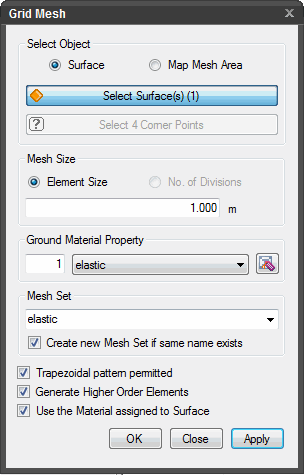
Select ObjectSelect the objects to be meshed. Surface Select surface(s) to be meshed. Map Mesh Area Select domains enclosed by lines to be map meshed. Select Surface(s) Select the surfaces to be map meshed (In case object selection is Surface).
Mesh Size Element Size Enter the desired element size.
Ground Material Property Select
a Ground
Material Property to be assigned to the mesh. Click
Mesh Set Enter the name of the Mesh Set. Create new Mesh Set if same name exists Check on
Trapezoidal pattern permitted Check
on
Generate Higher Order Elements Check on to generate higher order elements with intermittent nodes.
Use the Material assigned to Surface Generates mesh elements with same Ground Material Property as that of the source Surface.
Press the ESC key or
click
Note: When
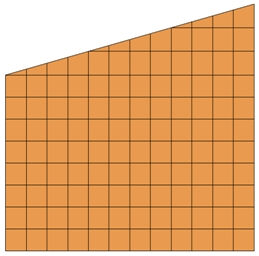
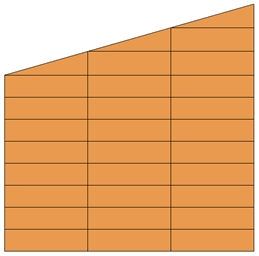
Trapezoidal Shape Permitted is checked on
If the option is unchecked, vertical lines are created only where the horizontal lines meet the sloped side. Therefore, the division of a domain is controlled by the criterion generating only triangular elements at the slope side as shown below:
| ||||||
|
|


 to the right to Add new, Modify or Delete Ground Material Property.
 to create a new Mesh Set if a Mesh Set with the same name exists.
  Click to generate mesh. The dialog box will
close automatically.
Click to generate mesh. The dialog box will
close automatically. to close the dialog box.
  After mesh is generated, work process will switch to the state of Select
Surface(s)/Curve(s) upon clicking.
After mesh is generated, work process will switch to the state of Select
Surface(s)/Curve(s) upon clicking.