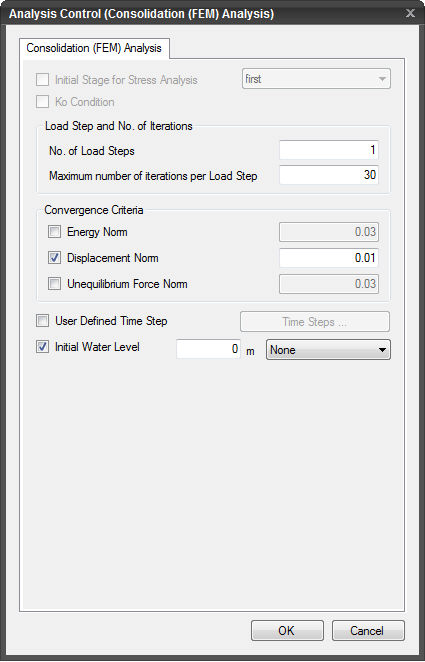
Consolidation (FEM)
Analysis
Finite Element Method
is used to carry out Consolidation Analysis.
Load Steps and No. of Iterations
No.
of Load Steps
Specify the number of
increments for the defined load. If 1 is specified, the load will be applied
all at once.
Maximum
number of iterations per Load Step
Specify the maximum
number of iterations for Analysis for each load increment.
Convergence
Criteria
Specify the basis on
which to assess the convergence in iterations. If multiple criteria are
selected, all the criteria need to be satisfied to consider to have been
converged.
Energy
Norm
Assess the convergence
on the basis of Energy (Unequilibrium force x incremental
displacement) Norm, which needs to be less than the specified value for
convergence.
Displacement
Norm
Assess the convergence
on the basis of iterative incremental Displacement Norm, which needs to
be smaller than the specified value for convergence.
Unequilibrium
Force Norm
Assess the convergence
on the basis of Unequilibrium Force Norm, which needs to be smaller than
the specified value for convergence.
User
Defined Time Step
Period
Total
Analysis time.
No.
of Steps
Number
of time steps the total Analysis time is divided into.
Save
Result
Check
on to save Analysis results at each step, which can be checked from the
Result Tree after completing the Analysis.
Log
Scale
Save
the time in the log scale.
Create
Steps
The
program generates steps.
Total
The
total sum must be equal to 1. The user directly defines the load steps.
Initial Water Level
Enter the underground
water level condition. A function created by a basic function or the Water
Level Function can be specified.
 After applying the selected Analysis case,
the dialog box will close upon clicking. After applying the selected Analysis case,
the dialog box will close upon clicking.
 Click the ESC key
to close the dialog box. Click the ESC key
to close the dialog box.
| 


