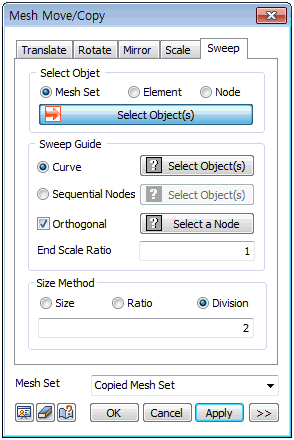
Select
the node, element or mesh set and directly select the
sweep guide or node positions that can substitute the
guide curve. Specify the center point. Apply a certain
ratio with respect to the center point or apply a selective
scale factor on the axial directions of the GCS.
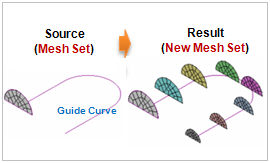
Sweep Guide
[Curve]
Only
1 guide curve can be selected. Hence, the curves for a
complex shape need to be created into a single wire in
advance.
[Sequential
Nodes]
When
selecting multiple nodes, be aware that the extrude direction
is specified by the selection order. When selecting the
nodes directly, the spacing between the nodes becomes
the element size so the size does not need to be set.
[Orthogonal]
The
copied shape is always perpendicular to the sweep guide
and the reference point can be set by selecting a node.
[End
Scale Ratio]
Adjust
the scale factor at the end of the element generation
to set the ratio for the sweeped mesh size.
For
example, entering 2 generates an element that is 2 times
larger at the sweep finish point.
Size Method
[Size]
: Directly specify the mesh size. For Sweep move/copy,
it is the sweep interval.
[Ratio]
: Define the sweep interval and number with a ratio between
0~1.
For
example, entering 0.3,0.5,1 moves/copies the mesh at 0.3,0.5,1
ratio positions on the total length of the sweep guide.
[Divisions]
: Define the sweep interval by the number of divisions
on the total length of the sweep guide. |
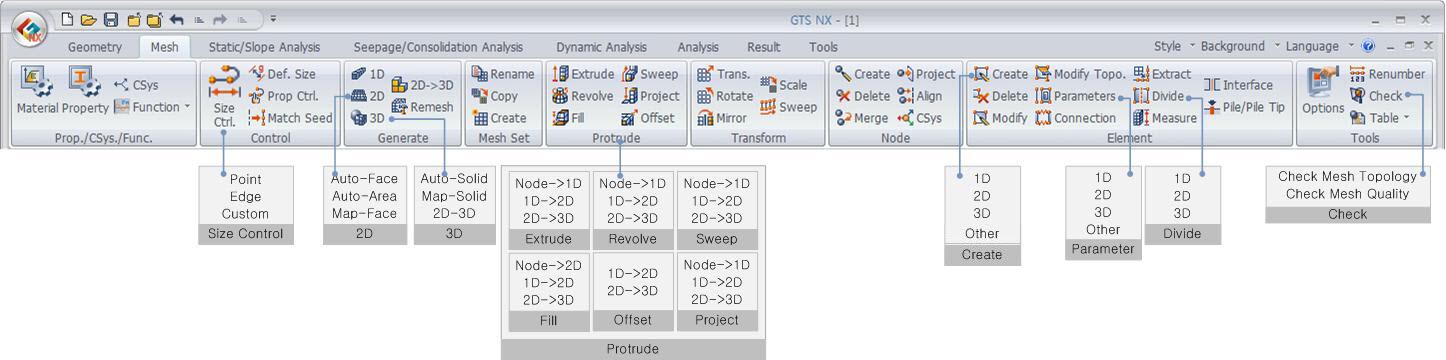

 Move a node,
element or mesh set along a sweep guide and copy.
Move a node,
element or mesh set along a sweep guide and copy.