Construction Stage: Stage Define Wizard

Function
Stage Define Wizard enables the user to define construction stages more conveniently. In order to use the Stage Define Wizard, the Mesh Sets, Boundary Sets, and Load Sets must be named according to a specific "naming" rule. Mesh Sets can be renamed using the Rename Mesh Set function.
Call
Model > Construction Stage > Stage Define Wizard
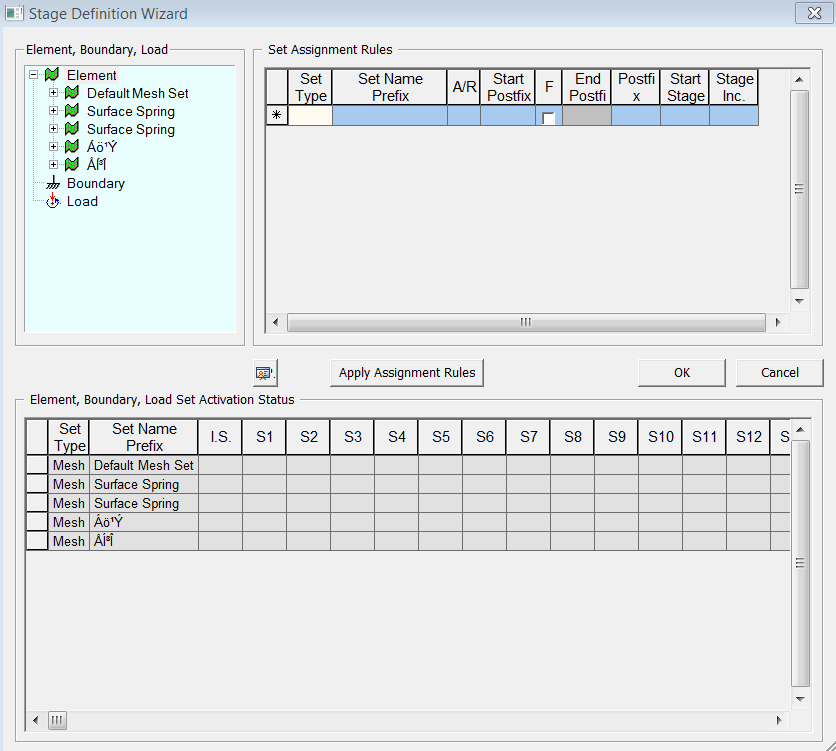
<Stage Define Wizard>
Element, Boundary, Load
The
list of all the predefined Mesh, Boundary, and Load Sets is displayed.
To define construction stage, drag the desired data sets to Set Assignment
Rule or Element, Boundary, Load Set Activation Status. Although the list
appears similar to the Works Tree, its displaying method is very different,
and the user must be cautioned while using it. In the list, all the sub-set
relationships are ignored and all Mesh Sets are treated independently.
Mesh Sets are grouped together by the defined naming rule. Please refer
to the following example for more details.
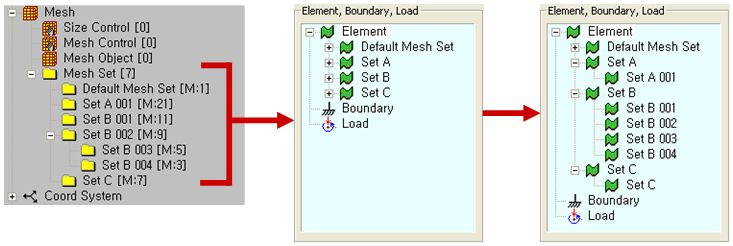
<Element, Boundary, and Load Set in Stage Definition Wizard>
Set Assignment Rules
Specify
construction stages using data set names.
|
Set Type
|
Only Element, Boundary , and Loads can be selected. |
|
Set Name Prefix |
Prefix names represent the unique name of the selected "Set Type." For example, if "Ground 001" represents the unique name of an element, then the Prefix name is "Ground." |
|
A/R
|
Either Activates (A) or Deactivates (R) Set Types. |
|
Start Post Fix
|
Post fix represents the unique number sequence of the selected "Set Type." For example, if "Ground 001" represents the unique name of an element, then the Post fix number is "001." |
|
F |
This option enables the "End Post fix." This options acts as a flag to allow users to end a sequence of elements at an user defined "Post Fix" number. |
|
End Post Fix |
Allows the users to specify an end of a sequence of "Set Types." |
|
Post Fix Inc, |
Increment Post Fix number. |
|
Start Stage |
Specify a start stage. |
|
Stage Inc |
Increment Start stage number. |
 Previews
the current stage status which is defined in Element, Boundary, Load Set
Activation Status. It is the same function as Simulate
Construction Stage.
Previews
the current stage status which is defined in Element, Boundary, Load Set
Activation Status. It is the same function as Simulate
Construction Stage.

It
assigns the data defined in Set Assignment Rules to Element, Boundary,
Load Set Activation Status.
Element, Boundary, Load Set Activation Status
It displays the currently defined construction stages. I.S. refers to the Initial Stage, and S1~SN represent the stage numbers. The added data set appears in light green, and the removed data set appears in orange. In each cell, the suffix of the relevant data set is displayed. If a data set does not include any suffix number, it will be displayed as "-", as shown in the table below (For example: Ground).
The data set can be dragged into the table directly from Element, Boundary, Load. In this case, assignment rules cannot be applied automatically. Dragging a data set while pressing Crtl key on the keyboard will remove the data set in a construction stage.
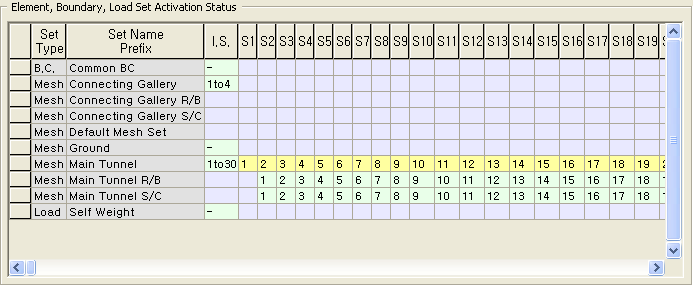
<Element, Boundary, Load Set Activation Status>
To delete a data set from a construction stage,
Press
the Delete key after selecting a data set. The construction stage will
not be deleted in this operation.
To delete a construction stage,
After selecting a column to be removed, press the Crtl and Delete keys together.
Notes
Data sets which are applied in the initial stage can be defined by having "0" in Start Stage and "0" in Stage Inc.
Detail option of each construction stage, such as load distribution factor, should be individually defined in Define Construction Stage.
Refer to the basic and advanced tutorials for examples of using Stage Definition Wizard.