|
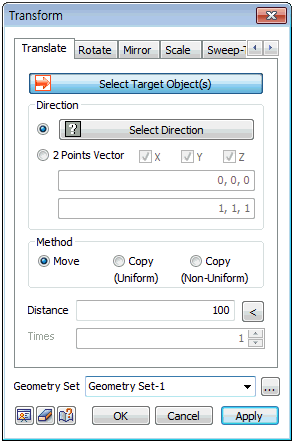
Select the shape to move and specify the direction. The direction can be defined in 2 ways:
1. [Select Direction] : Determine the direction vector for move. The user can select the datum axis, datum plane, face or edge.
2. [2 point vector] : Determine the direction vector to be the reference axis of the move by entering the coordinates of its Start and End points. The user can also directly click on the work screen to specify the Start and End points.
The target object can be moved/copied using [Move], [Copy (Uniform)] and [Copy (Non-Uniform)].
[Move]
Move target shape by desired distance.
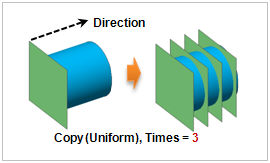
[Copy (Uniform)]
The repeat option is activated and copies the target object repeatedly by the entered number.
[Copy (Non-Uniform)]
List the copy distance by a space or comma (,) and when repeating, enter number @ distance
(Example : 2,3,4,4,4 or 2 3 3@4)
Distance
If the direction has a finite length (straight line edge or two-point vector), click the right "<" button to automatically enter the length.
Geometry set
Register the geometry shape created from the move command on the Geometry set. The user can specify the name of the Geometry set.
|


 Move the object by a certain distance. This command can be applied regardless of the type of shape. The [Copy] options can be used to leave the original object and only move the copied object.