|
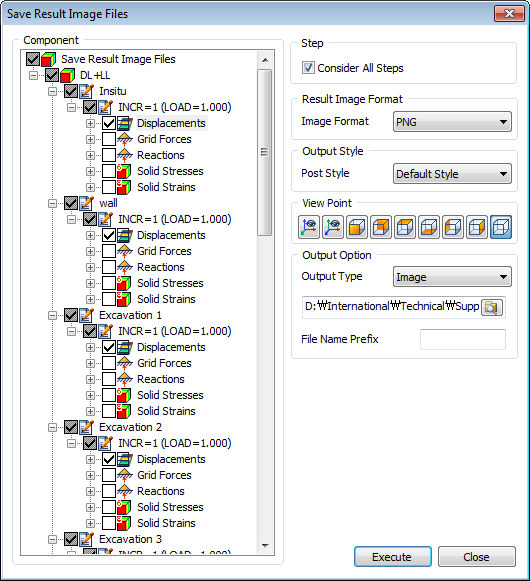
Check the desired article on the component tree menu and determine the image save format.
Consider All Steps
-
Function which allows to Select/Unselect Stage/Step/Result/Component level at the same time. If this option is unchecked, it will Select/Unselect individually.
-
All the subordinate components are checked for all stages when the result level is selected.
-
Only components are checked for all stages when the component level is selected.
FEA NX supports PNG, JPG, BMP image file formats.
Select the Post style. The Post style can be used to conveniently identify different result data, after the current post-processing graphic display options are saved on the Result tree.
Call up the Context menu on the left Works tree by right mouse click, and use the [Add New Post Style] menu to save the current graphic display settings. Double click the saved post-processing style to apply that post style.
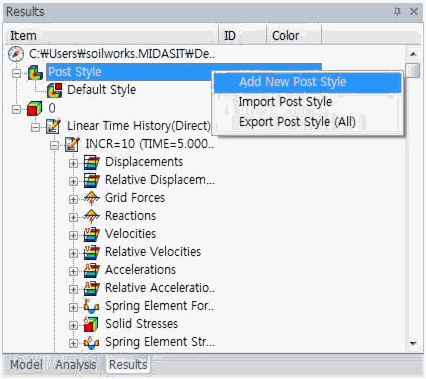
Post styles from a different model file can be imported by using the [Import Post Style] on the Context menu. Also, the [Export Post Style (All)] menu can be used to save the set Post style on the current model file separately.
The View point is provided to easily determine the model direction when capturing the screen.
The results can be saved as an image file or a word file using the Output form, and specifying the output location saves the image or word file on that location.
The File name prefix is the prefix that is automatically assigned in front of the file name during save.
|


 Output the finished analysis results as an image file, or a word file that contains an image file.