Edge Seed | ||||||
|
| ||||||
|
| ||||||
|
Input the Seed Data to define the size and spacing of element mesh. The density is defined prior to mesh generation. Seeding becomes useful if the user wishes to control the mesh in a desired pattern more so than mesh generated by Auto Mesh or Smart Mesh. If Map Mesh is used to generate mesh then, seeding information along the edges enclosing a domain must be defined. Applicable Modules:
| ||||||
|
| ||||||
|
| ||||||
|
| ||||||
|
From the Main Menu,
select Model
> Mesh > Edge Seed From the Command Line, type 'EdgeSeed' or 'ES' | ||||||
|
| ||||||
|
| ||||||
Select Curve(s)
| ||||||
|
|


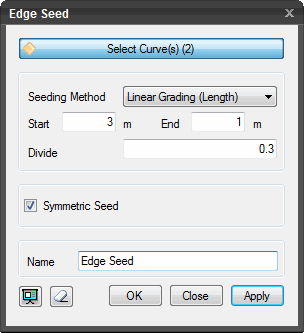
 to check the seeding information.
  to reset the dialog box.
  to generate Seed data and automatically close the dialog box.
  or press the ESC key to close the dialog
box.
or press the ESC key to close the dialog
box.  to generate Seed data. After seed data is
generated, the work process will switch to the state of Select Curve(s)
upon clicking.
to generate Seed data. After seed data is
generated, the work process will switch to the state of Select Curve(s)
upon clicking.