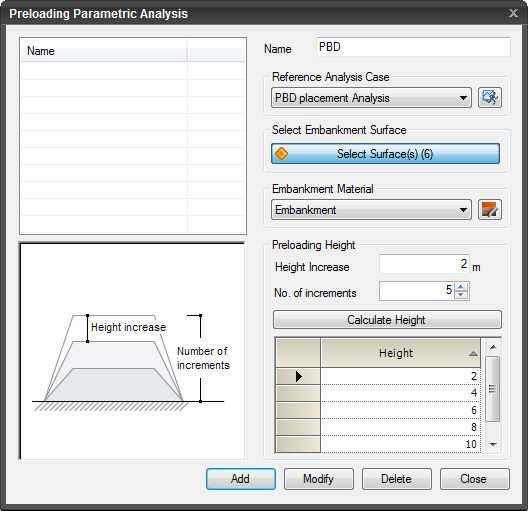
Name
Title of the Preloading
Parametric Analysis Case.
Analysis
Case to be referenced
Select the Analysis
Case for which Parametric Analysis will be performed. If the analysis
case has not been previously defined, click  to define the Analysis
Case. to define the Analysis
Case.
Select
Embankment Surface
Select the Embankment
section for the Parametric Analysis of the Preloading heights.
Embankment
Material
Select the Embankment
Material Property for the Parametric Analysis. If the property has not
been previously defined, click  to define the Property. to define the Property.
Preloading
Height
Height
Increase
Enter the height by
which each Preloading height will be automatically increased.
No.
of increments
Enter the number of
increments to automatically generate Preloading heights.
Calculate
Height
Heights of the Preloading
are automatically calculated.
Height
List the auto-generated
Preloading heights or the Preloading heights can be user-defined.
 Click to add the new Preloading Parametric
Analysis Case prepared. Click to add the new Preloading Parametric
Analysis Case prepared.
 Click to modify the selected Preloading Parametric
Analysis Case prepared. Click to modify the selected Preloading Parametric
Analysis Case prepared.
 Click to delete the selected Preloading Parametric
Analysis Case prepared. Click to delete the selected Preloading Parametric
Analysis Case prepared.
 Click the ESC key to close the dialog box. Click the ESC key to close the dialog box.
Note:
Preloading Parametric Analysis can be created
only when the analysis type is 1D-Consolidation Analysis. The
analysis cannot be performed for Construction Stage Analysis.
| 


