Self Weight
Check the time history analysis results through contours and animations by time steps.
Applicable Modules:
Ground |
Slope |
Soft Ground |
Foundation |
Seepage |
Dynamic |


From the Main Menu, select Results > Time History Results > Draw Hysteresis
From the Command Line, type 'THResultPlot'
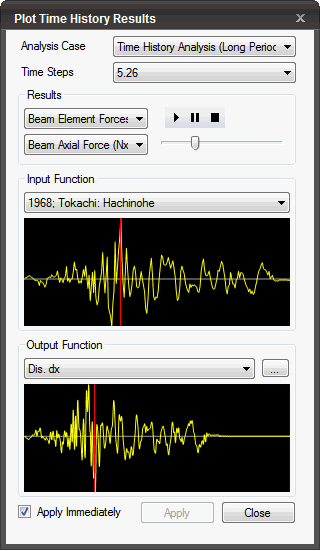
Analysis Case
Select the Analysis Case for which the results will be checked by time steps. (Only the Analysis Cases, which have been completely analyzed for time history analysis, will be listed.)
Time Step
Specify the time step as defined under General section of Time History Analysis Load Set. The ’r;Time Step’ values are defined on the basis of ’r;End Time’, ’r;Time Increment’ and ’r;No. of increment steps for output’
Results
Displacement: DX(V), DZ(V), DXZ(V), RY(V)
Velocity: VtX(V), VtZ(V), VtXZ(V), VrY(V)
Acceleration: AtX(V), AtZ(V), AtXZ(V), ArY(V)
Ground Element Stress: SXX, SYY, SZZ, SXZ
Beam Element Member Force: Nx, Qz, My
Truss Stress/Force: Sx, Nx
Input Function
Select the Time History Function as defined for the Analysis.
Output Funcion
Select the function defined in Time History Result Function.
 The results by time steps are repeatedly
produced from the selected time step to the end time.
The results by time steps are repeatedly
produced from the selected time step to the end time.
 Stop generating the results by time
steps temporarily.
Stop generating the results by time
steps temporarily.
 Stop generating the results by time
steps.
Stop generating the results by time
steps.
Apply Immediately
Generate the results at the selected time step.
 Click
to close the dialog box.
Click
to close the dialog box.