 Clipping Plane Clipping Plane
Geometric shapes can be cut by a specified plane direction
and the section can be viewed. Necessary sections can
be saved by pressing the [Add] button. Clicking the icon
shows the clipped section.
This function can be used to understand the interior
shape of the geometry during pre-processing and is also
useful in displaying particular cross sections during
post-processing.
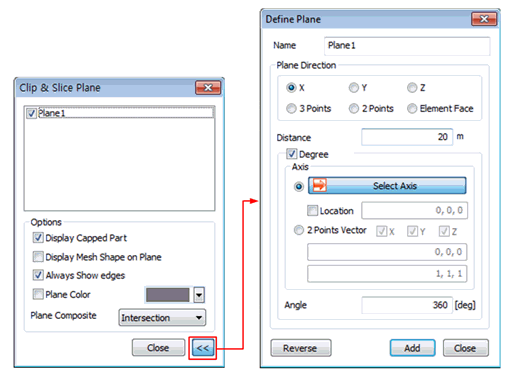
[X]: Cuts the shape in the
plane normal to the X-axis. It is possible to edit the
distance and move the plane.
[Y]: Cuts the shape in the
plane normal to the Y-axis. It is possible to edit the
distance and move the plane.
[Z]: Cuts the shape in the
plane normal to the Z-axis. It is possible to edit the
distance and move the plane..
[3 point definition]: Defines
3 points in the work-plane to form a cutting plane. The
shape is cut in this plane.
[2 point definition]: Defines
2 points in the work-plane to form a cutting plane. The
shape is cut in this plane.
[Element face]: Cuts the
shape in the plane containing the element face.
Display the distance between
the plane and the origin.
Cross-section can be defined
by Angle from selected axis.
Show the section by changing
the normal direction.
Uncheck to display the section
only.
Check to display the mesh
formed on the section.
Check to view the edges that
make up the geometric shape.
Specify the color of the
section.
[Union]
Displays all sections and
shapes on the screen.
[Intersection]
Displays the intersection
between sections and shapes on the screen.

 Mirror Plane Mirror Plane
Displays the symmetrical model centered on a specified
plane or planes normal to the X, Y, Z axis. The distance
between the original model and the symmetrical model can
be adjusted.
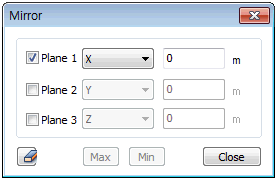 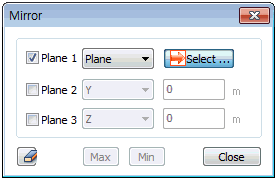
When configuring planes 1, 2, 3 individually, clicking
the [Max] button displays the furthest symmetrical model
with respect to the original model, while clicking the
[Min] button displays the closest symmetrical model with
respect to the original model.
 Iso Value Surface Iso Value Surface
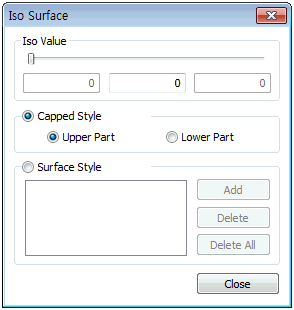
Sets a criterion for the resulting value and displays
an area inside/outside of a specified value range. Checking
the 'Surface Style' displays an area with the same result
value as a face. |


