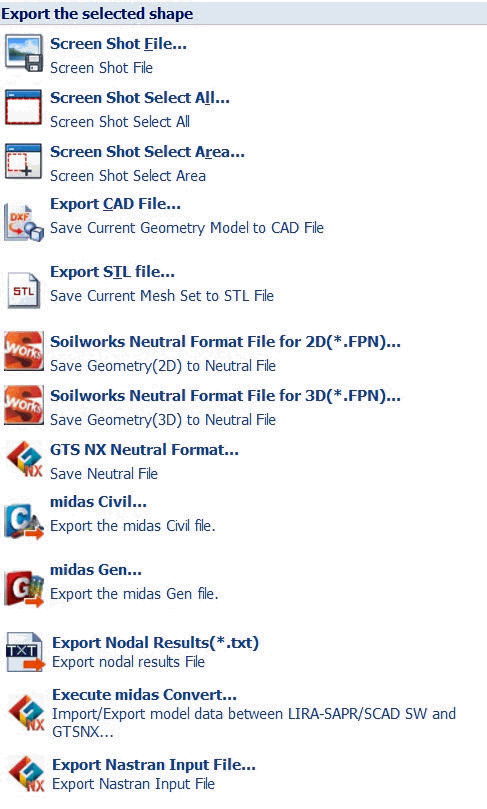
The work
plane can be saved using [Screen Shot file]. [Screen Shot
Select All], [Screen Shot Selected Area] tabs.
The [Screen Shot file] tab only saves the work plane
and the [Screen Shot Select All] tab saves the whole image.
The [Screen Shot Selected Area] tab saves the area selected
by the user. PNG, JPG, BMP, GIF image file formats are
supported.
CAD geometric shapes and meshes on the work plane can
be exported. CAD geometric shapes are exported as Parasolid
files (*.x_t, *.x_b) and meshes can be exported as a STL
file (*.stl) or a neutral file (*.fpn) supported on other
Midas programs (GTS/NFX/FEA/SoilWorks) and non-MIdas programs.
Export
Soilworks Neutral Format File for 2D
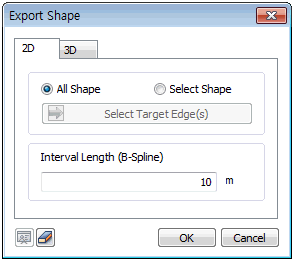
Export the geometric shapes (Line) of a GTS NX 2D model
as a SoilWorks neutral file. The user can select all shapes
on the screen, or directly select the edges to export.
[Spacing length (B-Spline)]: Divides a B-spline edge
into equal spacing and export. It does not apply to Line
or Arc types, which are not B-Splines.
Export
Soilworks Neutral Format File for 3D
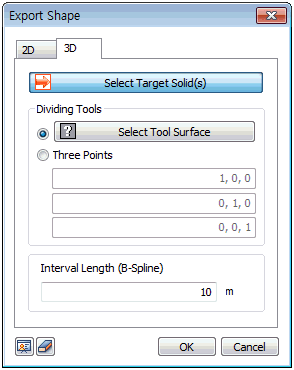
Export the geometric shapes (Solid) of a GTS NX 3D model
as a SoilWorks neutral file.
[Target solid]: Select the target 3D geometric shape
(Solid).
[Tool face]: Select the tool face to cut the solid.
The tool face can be directly selected, or 3 points can
be selected to create a cutting plane.
[Spacing length (B-Spline)]: Divide the B-spline outlines
of a solid into equal spacing and export. It does not
apply to Line or Arc types, which are not B-Splines.
Export
FPN file
This format links the model
information file created on GTS NX to Midas family programs
(GTS NX, FEA, NFX, SoilWorks, GeoXD). This file format
also enables user to exchange information between different
programs using text format.
Export Midas Civil
This format links the model
information file created on GTS NX to Midas family program
(Midas Civil) as *.mct formation.
Export Midas Gen
This format links the model
information file created on GTS NX to Midas family program
(Midas Gen) as *.mgt formation.
Export
Nodal Results (*.txt)
Export Nodal Results feature from GTSNX model to midas
Gen / Civil allows for outputting the results of the reaction
/ displacement results calculated from the existing constraints
as well as the load-displacement results of the nodes
subjected to the nodal load.
Soil-Structure
Interaction procedure steps:
1)
Gen / Civil superstructure modeling. GTSNX soil
ground and superstructure modelling.
2) Analysis of Gen / Civil superstructure model.
3) Gen / Civil Superstructure Reaction Results export to
apply as nodal loads in GTS NX
4) GTS NX soil ground and superstructure analysis.
5) GTS NX Load-Displacement result applying in Gen / Civil
as the node spring load.
6) Repeat 2) ~ 5) steps and finish analysis when convergence
satisfies.
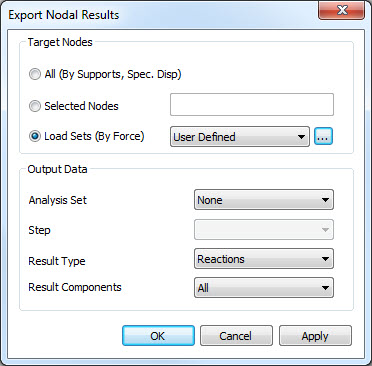
Target Nodes
All (By Supports) – reactions
and displacements will be exported at only the nodes with
constraint boundary conditions defined according to the
analysis set and step chosen by the user. The result of the reaction force / displacement
of the node subjected to the enforced displacement can
be called up as a nodal load / enforced displacement by
Gen / Civil.
Selected Nodes – allows
users to select specific nodes for output. Reactions will
be exported at only the nodes with constraint boundary
conditions defined according to the analysis set and step
chosen by the user. Displacements will be exported at
all selected nodes. The
result of the reaction force / displacement of the node
subjected to the enforced displacement can be called up
as a nodal load / enforced displacement by Gen / Civil.
Load Sets (by Force) -
reaction force / displacement will be exported at only
the nodes where Load Set has been defined (as Force type
only) according to the analysis set and step chosen by
the user. User defined choice for specific load set is
allowed.
In addition to the reaction
force / displacement results, the "load-displacement"
type was added to the output result type.
The 'Load-displacement'
type will simultaneously output the value of the nodal
load considered in the load set and the displacement result
calculated at the corresponding node after the analysis
and will be loaded in Gen / Civil as Multi-Linear Point
Spring (Unsymmetric) type.
The 'load' value is calculated
as Σ (node load / load increment number) entered, and
the cumulative displacement generated at the stage where
the 'load' is applied is transferred to the 'displacement'
data.
※
Precautions
1)
Gen / Civil> The Multi-Linear Point Spring (Unsymmetric)
type requires a minimum of 3 data. Therefore, when outputting
'load-displacement' type in GTS NX, please perform analysis
to satisfy the number of data.
2)
Gen / Civil> The Multi-Linear Point Spring (Unsymmetric)
type is designed to receive increasingly larger values
of the load / displacement data. Therefore, if the displacement
result calculated by the GTS NX is output as a decrease
rather than as an increase, the Gen / Civil will not be
able to recall the value.
Output Data
Analysis Set – select
the analysis case for output.
Step – select the construction
stage set for output.
Results Type – opt to output
reactions or displacement.
Results Component – select
the components for output. Reactions (All, FX, FY, FZ,
MX, MY, MZ). Displacements (All, DX, DY, DZ)
Export
Nastran Input File
This tool allows the user
to export all the model attributes into an executable
Nastran File.
|


 s
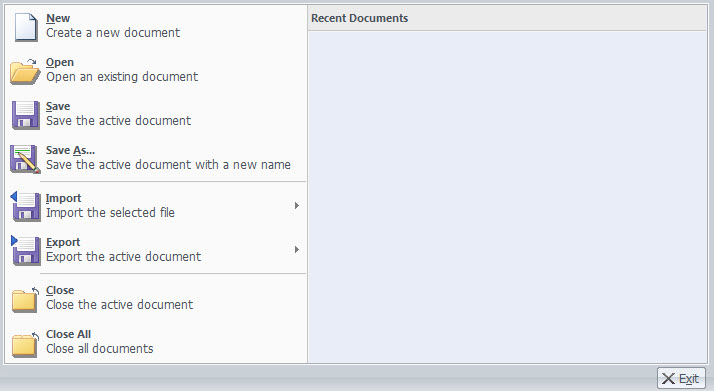
s This function
can capture the work plane or export geometric shapes
and meshes.
This function
can capture the work plane or export geometric shapes
and meshes.