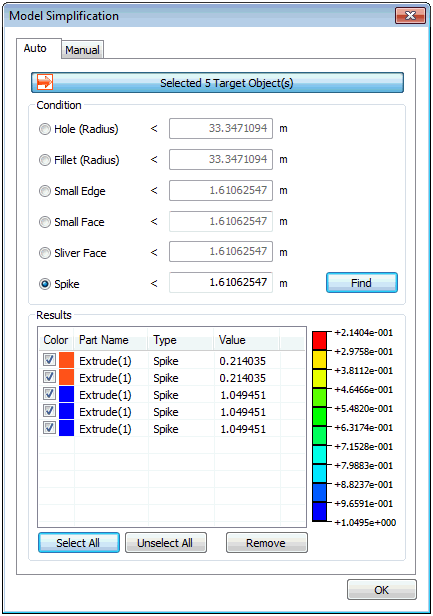
Select
the geometry shape to check and input the micro-line/micro-face
threshold values. Press the find button to automatically
find faces or lines with areas or lengths less
than the threshold value. The user can check and
delete the selected shapes.
When using an imported
geometry shape data file, very small faces (especially,
long faces with small widths) can also be imported,
which leads to a reduction of work efficiency
and the creation of incorrect shapes. The best
way to solve this problem is to erase the problematic
faces and restructure the shape using adjacent
faces. However, if the model is too large and
the problematic faces cannot be checked individually
by the naked eye, it is efficient to use this
option to adjust the allowance and automatically
delete small faces.
When using many edges to
create a face, some faces may not form. This problem
can be caused by very short edges that overlap.
In this case, the function can be used to find
and delete such micro-edges when creating a face.
Condition
: Find and remove selected entities automatically
Hole (Radius) : Input
radius of hole
Fillet (Radius) : Input
radius of fillet
Small Edge : Input the
length of edge
Small face : Input the
length for the longest edge of face
Silver Face : Input the
width of strip
Spike : Input the width
of spike
Results
: All entities which meet criteria are listed
in the dialog
Selected entities will
be highlighted in the model view
Double click on the selected
entity to fit zoom to window
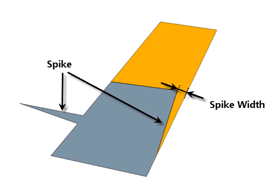
[Spike
Width]
|


 Find and delete
faces/Edges that are smaller in value (area for face,
length for edge) than the input value.
Find and delete
faces/Edges that are smaller in value (area for face,
length for edge) than the input value.