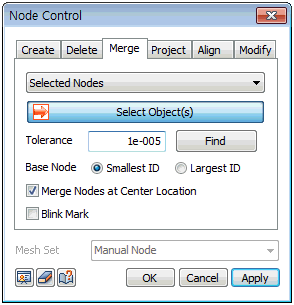
Selected
Nodes
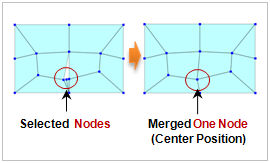
Select the nodes to merge
and define the merge criterion. The tolerance
is the allowable limit of the merger; nodes with
spacing smaller than the tolerance are merged.
Selecting ‘find’ automatically searches for nodes
below the tolerance. The merged node positions
are specified by the node number (Smallest ID/Largest
ID) or the Center of Nodes (Merge Nodes at the
Center Location). The [Blink Mark] function indicates
the Free Nodes on the screen, which can be used
to distinguish modeling errors such as Free Edges.
2-Nodes
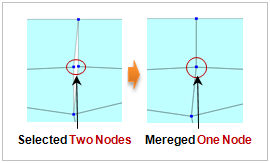
Merge 2 nodes by selecting
the moving node and maintained node. If a Free
Edge is created on a small area, the Merge 2-Nodes
function can be used to edit easily. |



 Merge
2 or more nodes into 1, or merge two nodes by selecting
be moved and be kept node continuously. It is mostly used
to connect nodes between elements that are slightly apart
during the modeling modification process. It is useful
when checking for model errors due to free edges by checking
the free nodes that are not connected to an element.
Merge
2 or more nodes into 1, or merge two nodes by selecting
be moved and be kept node continuously. It is mostly used
to connect nodes between elements that are slightly apart
during the modeling modification process. It is useful
when checking for model errors due to free edges by checking
the free nodes that are not connected to an element.