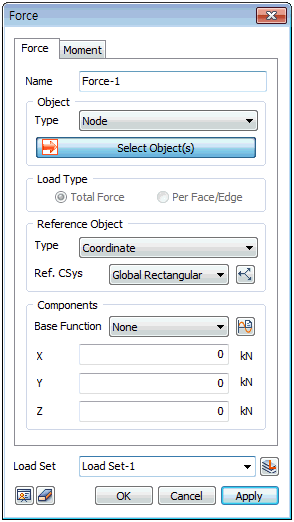
Select
the node where the load will be applied and set the size
and direction. The load direction can be set using Default
Load or Reference Object Load methods. For Default Load,
the x, y, z, components are input with reference to the
coordinate system in the bottom right corner. For Reference
Object Load, select the target and reference shape to
set the load direction. If the reference shape is a line,
the component direction is set in the line creation direction.
If the reference shape is a surface, the normal direction
to the surface becomes the z component direction and the
left, right directions become the x, y component directions.
If
the selected target shape is geometric, the Force can
be selected as either a total force or individual loads
in Load Type as shown below. For total force, the input
load size is considered as the total force acting on the
selected line/surface and is distributed evenly to all
nodes. For individual loads, the input load size is applied
to all nodes of the selected line/surface.
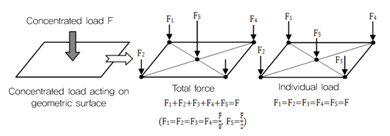
<Total force / Individual load
processing>
The
total force is distributed according to the length or
area ratio when two or more targets are selected and the
individual load is applied to each selected target.
[Object]
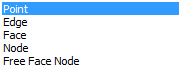
The
applied load is defined on the node, but the selection
target can also be set as a geometry shape (edge, surface
etc.) or using auto-select free face nodes. For an edge
or surface, the selected shape must have been used for
element creation and the force is applied to all nodes
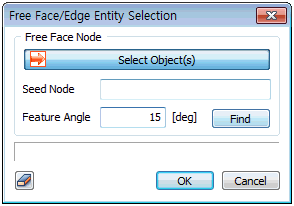
in the specified direction/size. For free face nodes,
select a free face node and all points that make contact
with the node-containing element at an angle smaller than
the specified angle (feature angle) will automatically
be selected.
[Reference
Object]
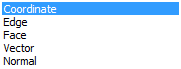
The
load direction can be set using different methods. The
reference coordinate system is the global rectangular(cylindrical)
coordinate axis. Geometry shapes (edge and surface) can
be selected as a reference direction. Selecting
edge or surface displays the coordinate system of the
selected shape and the load is set with reference to that
system. The vector is used to specify the load direction
using X,Y,Z vector components. The tangent direction can
only be selected for surface objects and automatically
sets the direction in the tangent direction of the selected
surface.
[Components]
Input
the load size according to the set direction. A positive
(+) value applies the load in the set direction and a
negative (-) value applies the load in the direction opposite
of the set. The load size changes with respect to the
coordinate value increase in the GCS can be defined using
a reference function. Here, the input value is multiplied
by the function value for application. The [Base Function]
for any force can be set by the user by creating an user
-defined function, however once it is created and inputted,
a scale value has to be entered in the components according
to the user in either X,Y,Z direction otherwise, an error
message will pop out on the output section of the screen.
|


 Apply the Force
or Moment load on an element node. Force is one of the
most fundamental loads and it can be specified by 3 force
components and a moment for each node. The direction can
be defined with reference to an arbitrary coordinate system.
Apply the Force
or Moment load on an element node. Force is one of the
most fundamental loads and it can be specified by 3 force
components and a moment for each node. The direction can
be defined with reference to an arbitrary coordinate system.