|
▒ Overview
|
 Perform boolean operations on selected shapes. Perform boolean operations on selected shapes.
|
▒ Methodology
|
|
Fuse
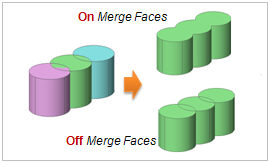
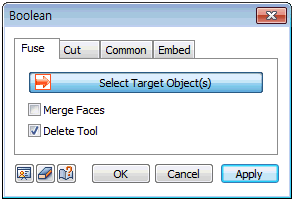
Merge shapes using the [Fuse] function. It is mostly applied to solids and solids and the outer boundary lines of each shape remains. However, if the [Merge faces] option is on, the objects are defined as a single face and the outlines are automatically removed.

For general cases, the [Fuse] function is applied to solids.
-
Fuse of line(edge, wire) and line(edge, wire) : All lines are cut at the intersection points and form a single wire. If the lines are not connected, the operation forms a compound shape.
-
Fuse of face(face, shell) and face(face, shell) : Does the same function as Geometry > Boolean > Surface > Sew
|
|
Cut
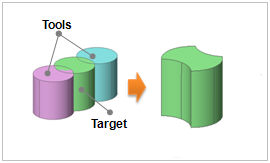
Remove the overlap between the target shape and tool shapes using a [Cut] function. It is mostly applied to solids and solids.
For general cases, the [Boolean > Cut] function is applied to solids.
-
Cut of master line (edge, wire) and tool shape (face, shell) : Divide the edge at its intersection with the shape, creating wires.
-
Cut of master shape (face, shell) and tool shape (face, shell) : The overlapping shape is removed from the master shape.
-
Cut of master shape (edge, wire) and tool shape (solid) : The intersection with the solid is removed from the shape.

|
|
Common
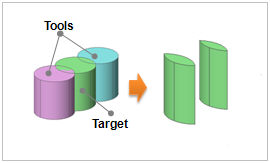
Remove everything but the overlap between the target shape and tool shapes from the [Common] function. It is mostly applied to solids and solids. If the [Common] is applied to two faces, it may create an inappropriate shape.
For general cases, the [Boolean > Common] function is applied to solids.
-
Common of line (edge, wire) and shape (face, shell) : Divide the edge at its intersection with the shape, creating wires.
-
Common of shape (face, shell) and shape (face, shell) : Only the overlap between the shapes remain as a shell.
-
Common of shape (edge, wire) and shape (solid) : The overlap between the shape and solid remain as a shell.
For all cases, the results are the same.
|
|
Embed
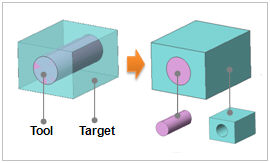
Embed the target shape on the tool shape. It is often used when modeling a solid element that has another solid element with a different material embedded in it. The [Common] function is done between the target shape and the tool shape and the results are embedded into the target shape.
Delete Tool
Remove the tool shape after each operation.
1. Using this function on Points or Compounds can create an incorrect shape and it is not recommended.
2. [Fuse], [Cut] and [Common] functions are greatly affected by shape error. The shape error determines whether a shape is intersecting an adjacent shape and, as the compound modeling process continues, the errors that may cumulate and cause problems. If the [Fuse], [Cut] and [Common] set operations do not function properly, use the Boolean > Surface > Sew function to correct for errors and then re-perform the operation.
|
|
|
|
|

