|
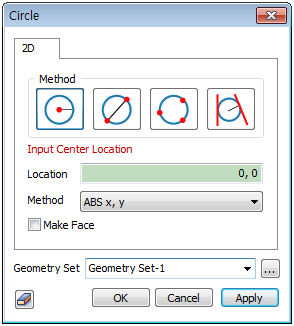
There are 4 ways to draw a circle. The points used in each method can be specified directly by clicking on the workplane of the work screen.
 : Center coordinates and radius : Center coordinates and radius
Create a circle using center point coordinates [(Absolute x,y)] and radius.
 : End points of diameter : End points of diameter
Create a circle using one end point of the diameter [(Absolute x,y)] and the other end point [(Absolute x,y), (Relative dx,dy), (Length, Angle)].
 : Three points on the circle : Three points on the circle
Create a circle using the coordinates of three arbitrary points on the circle [(Absolute x,y)].
 : Within and adjacent to two edges : Within and adjacent to two edges
Create a circle that is within and adjacent to two existing edges. The user needs to input the radius and select two edges.
Make face
Creates the circular plane used to outline the circle.
Geometry set
Register the created circle on the geometry set. The user can specify the name of the geometry set.
|


 Create an edge type circle on the workplane.