|
Direction
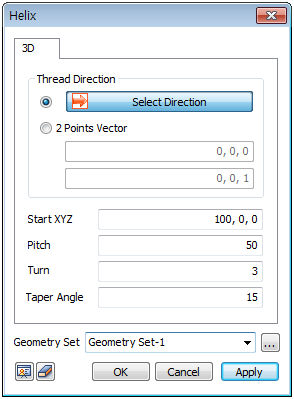
Determine the helix direction by selecting the reference axis direction or a two-point vector.
[Select direction] : Determine the direction vector that is to be used as the reference axis of the helix. The user can select the datum axis, datum plane, plane or edge.
[2 points vector] : Determine the direction vector that is to be the reference axis of the helix by entering the coordinates of its start and end points. The user can also directly click on the work screen to specify the Start and End points.
Other inputs
Create a spiral by entering the Start XYZ, Pitch, Turn and Taper angle.
[Start XYZ] : Input the 3D absolute coordinates for the start point of the helix. The user can also directly click on the work screen to specify the point.
[Pitch] : Defined as the height increase in the axis direction per one rotation period.
[turn] : The number of revolutions in the helix.
[Taper angle] : The angle between the reference axis and side slope of the helix.
Some errors can occur when creating a helix; so the input value and the angle between the reference axis and side slope may not match exactly.
Geometry set
Register the generated helix on the geometry set. The user can specify the name of the geometry set.
|


 Create a wire type helix on the workplane.