|
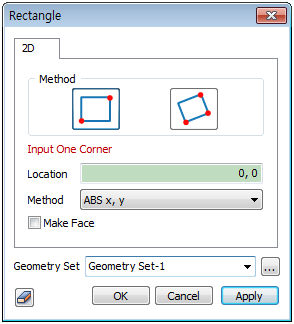
 : Diagonal End points : Diagonal End points
Creates a rectangle using one end point [(Absolute x,y)] and the other diagonal end point [(Absolute x,y),(Relative x,y)].
 : 2 End points and length : 2 End points and length
Creates a rectangle using one End point [(Absolute x,y)], a second end point [(Absolute x, y),(Relative x,y)] and the length inputs in this order.
The user can directly click on the workspace of the work screen to specify points.
Make Face
Create a rectangular plane that has the rectangle as its boundary. In this case, it does not create a border of rectangular wire.
Geometry set
Register the generated rectangle on the geometry set. The user can specify the name of the geometry set.
|


 Create a wire type rectangle on the workplane.