|
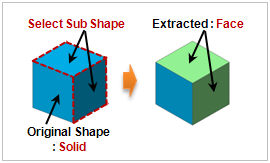
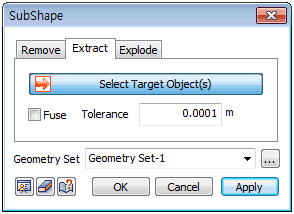
Select the geometry shape (face, line, point) to extract. A face can be extracted from a face, a line from a face and a point from a line. If the extracted shapes are within the error range, check the [Merge] option to merge the shapes into a single shape. For example, an object that is extracted with two adjacent faces, such that the error between the outlines is small, can create a single shell without any free edges.
Geometry set
Register the created shape on the Geometry set. The user can specify the name of the Geometry set.
|


 Extract a geometry shape (face, line, point) of the selected shape to create an independent shape.