|
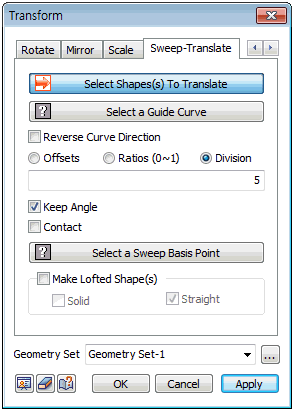
Select the shape to move and specify the guide curve (edge or wire).
Check [Reverse Curve Direction] to move in the opposite direction of the guide curve.
There are 3 move methods: [Offsets], [Ratio (0~1)], [Division].
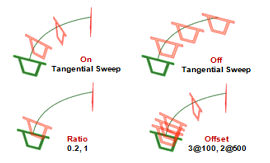
1. [Offsets] : Specify the offset interval and input the move distance. If the entered move distance is longer than the guide curve, the shape does not move past the end of the guide curve.
Enter a space or comma to enter multiple distances to copy and move multiple shapes.
2. [Ratio (0~1)] : Specify the guide curve ratio and input the move distance. The ratio at the Start point of the guide curve is 0 and the ratio at the End point of the guide curve is 1. Enter multiple ratios to copy and move multiple shapes.
3. [Division] : Specify the number of guide curve divisions and input the move distance. Copy and move the equally divided edge to the division position.
Check the [Keep angle] option to apply the curves of the guide curve during sweep pattern move and check the [Contact] option to move the guide curve of the target object to the Start point.
Select a Sweep Basis point
The reference point used when applying a vertical, line contact option on a plane. The reference point must be a particular point on the shape.
Make Lofted Shape
It is convenient to use this option instead of the loft extend option when creating a shape by interpolating a section along a guide curve with discontinuous curvature. The solid can be made in line form. The resulting shape is created and the original shape is not copied.
Geometry set
Register the geometry shape created from the sweep pattern command on the Geometry set. The user can specify the name of the Geometry set.
|


 Copy the target object along a guide curve. This command can be applied regardless of the type of shape.