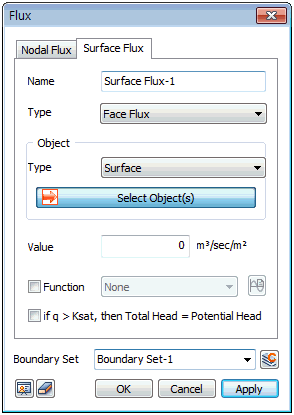
Input the surface inflow/outflow
rate of a specific point in terms of flow rate
per unit area. It can be defined as either an
[Edge Flux] or [Face Flux]. Generally, the [Edge
Flux] is input for 2D models and [Face Flux] is
input for 3D models.
The Face flux can be defined
by entering the value on the edge or surface geometry,
or directly entering it on the selected element
edge.
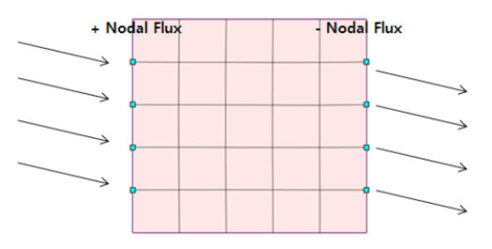
Define the inflow input
from rainfall etc. as a (+) value and define the
outflow input from excavation or pumping etc.
as a (-) value.
Transient analysis (where
the water level changes with time) can be defined
as a [Function].
When using a function,
the input value and function value are multiplied
and reflected in the analysis.
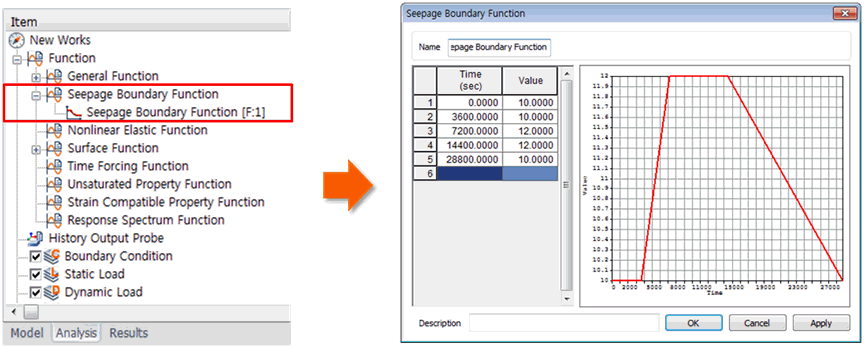
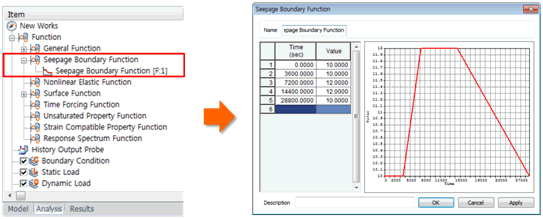
The defined function is
registered under Function > Seepage Boundary
Function, and can be edited as a table using the
right mouse click > Edit.
If
q > Ksat, then Total Head = Pressure Head
The flux-head boundary
conversion condition for rainfall analysis.
For example, the Surface
flux can be used to define the ground surface
boundary conditions when the rainfall intensity
on the ground surface is inputted.
This function applies
a forced inflow rate, as large as the rainfall
intensity, onto the ground surface. If the absorption
capability of the soil stratum surface is larger
than the rainfall intensity, the soil stratum
absorbs all the rain water. However if the absorption
capability is smaller, rain is absorbed into the
ground surface by only the absorption capability
amount, and the rest of the rain flows across
the ground surface.
If the rainfall intensity
is larger than the absorption capability, the
ground surface is in a saturated state during
rainfall, as if the groundwater level existed
above the surface. Hence, the area of rainfall
needs to be changed to a water level line.
Use the [If q > Ksat,
then Total Head = Pressure Head] option to automatically
change the ground surface boundary from the existing
rainfall intensity inflow condition to a water
level condition for analysis. This option is only
available when the rainfall intensity acting on
the surface is larger than the absorption capability
of the ground surface.
Boundary
Set
Register the set constraint
conditions on the desired boundary set. The user
can specify the name of the boundary set.
|


 Input the flux
at an arbitrary node. The nodal flux is a boundary condition
used in Seepage/Consolidation analysis (Fully-Coupled).
Input the flux
at an arbitrary node. The nodal flux is a boundary condition
used in Seepage/Consolidation analysis (Fully-Coupled). Input
the surface flux boundary condition in terms of flow rate
per unit area. The surface flux is a boundary condition
used in Seepage/Consolidation analysis (Fully-Coupled).
Input
the surface flux boundary condition in terms of flow rate
per unit area. The surface flux is a boundary condition
used in Seepage/Consolidation analysis (Fully-Coupled).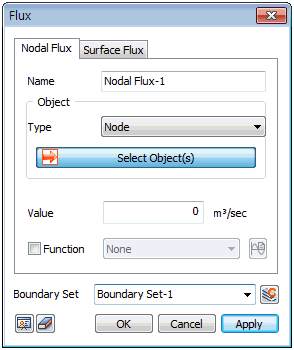
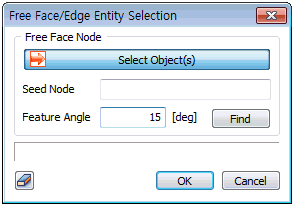
 button to select the reference node, target
element and feature angle.
button to select the reference node, target
element and feature angle.