|
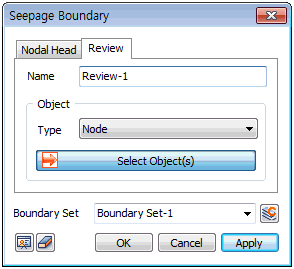
Select the points upon which to place the Review boundary.
For example, assuming that seepage occurs at the downstream face of a homogeneous dam, the seepage line intersecting the downstream face cannot be found. In this case, set the review boundary and conduct iterative calculations.

<Specify Review boundary node (ex.) >
The target can be selected from [Node], [Edge], [Face], [Free Face Node].
For [Node], the node is directly selected to define the node on which iterative calculation will be conducted. Selecting [Edge] or [Face] conducts the review for all nodes in the geometry shape.
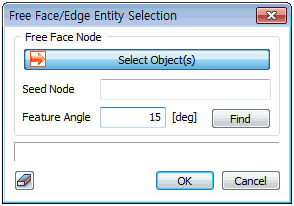
For [Free Face Node], select a free face node and all points that make contact with the node-containing element at an angle smaller than the specified angle selected. Press the  button to select the reference node, target element and feature angle. button to select the reference node, target element and feature angle.
The pore pressure P measured at the re-examined node is considered as the following condition, and these two roles can be used to automatically search for the seepage surface.
1) When P > 0, Consider as P=0
2) Delete when P < 0
Boundary Set
Register the set constraint conditions on the desired boundary set. The user can specify the name of the boundary set.
|


 Conduct iterative calculations using the Review function when the exact seepage line is hard to find. Review is used as a boundary condition for Seepage/Consolidation analysis(Fully-Coupled).