|
|
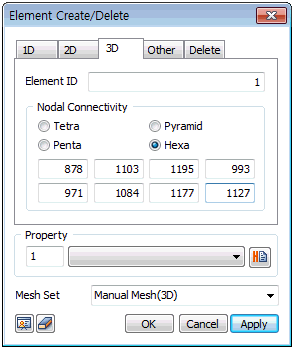
Create a tetrahedral, pyramidal, pentahedral, hexahedral shape depending on the number of selected nodes. Directly input the node numbers that will become the corners of the 3D element, or select already created nodes in order on the screen. The element number is automatically set to maximum previous number+1 and when entering the number directly, the number cannot overlap with an existing node number. Properties which will be assigned can be set or added and the mesh set can be created separately.
|


 Create a 3D element filling the space between selected nodes. It is useful when creating individual 3D elements of a complex geometry.