|
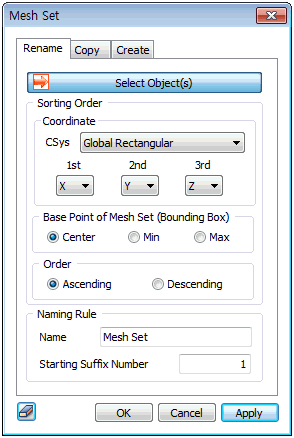
Select all the mesh sets that need name changes and set the classified order and name. For example, selecting 3 mesh sets and entering “Excavation” for the name and “3” for the Start number changes the name of the mesh sets in the classified order to “Excavation-003”, “Excavation-004”, “Excavation-005”.
Coordinate
Specify the mesh set order with respect to the Global Rectangular or Cylindrical coordinate system. Specify the order according to priority by specifying each coordinate axis direction in 1st, 2nd, or 3rd priorities. The 1st axis is given the most preference, and the 2nd axis becomes the order reference when the coordinates of the 1st axis are equal. Hence, if the target is assigned an order in the 1st axis, the order does not change even if the coordinates in the 2nd axis is different. If the coordinates are the same in both the 1st and 2nd axes, the 3rd axis determines the order.
Base Point of Mesh Set (Bounding Box)
Specify the coordinates of the calculation position used for order comparison. For example, selecting the center compares the position of the mesh set using the coordinates of the center point of the mesh set boundary box.
Order
Increase or decrease the suffix number in order of specification.
|


 Change the name of the mesh set by adding numeric suffixes in the specified order. Because the data used for construction step is classified by the name of the mesh set, it is recommended to classify the mesh sets by domain or property in advance. It is especially useful to use the Wizard to automatically set the construction step.