|
|
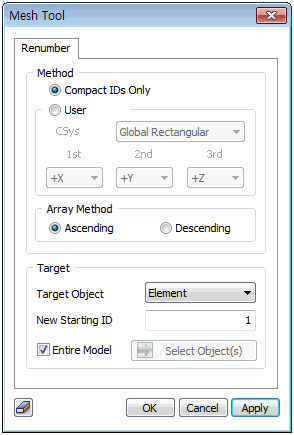
Select the target nodes and elements and input the starting number. The organization can be set for the whole model, or only for the selected nodes (elements). Use the [Compact IDs Only] option to organize the node number continuously starting from 1, and the coordinate system priority for the organization reference can be selected from User defined. Assign the minimum number with reference to the first axis. The numbers are then organized by the second axis within the range that does not affect the first axis. The numbers are organized again by the third axis within the range that does not affect the first and second axes.
For example, if the first is X, second is Y, third is Z, then the organization is first d1 by considering the X coordinates specified by the first priority. The number increases from the small X coordinate to the large X coordinate, and if the X coordinates are the same, then the next priority Y coordinates are considered. For elements, XYZ coordinates of the center of gravity is used for organization.
The number order can be selected from Ascending/Descending order.
|


 When mesh and node numbers are recomposed, results can be checked in an organized manner.