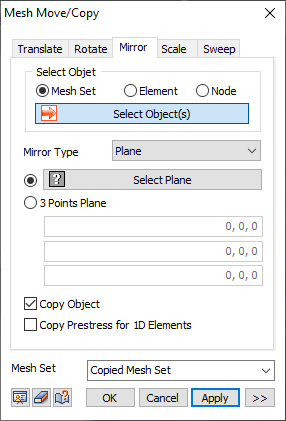
Select
the node, element or mesh set to mirror move/copy and
select the mirror type. The mirror types are point, axis
and plane. Use the copy target option to use mirror move
and copy simultaneously.
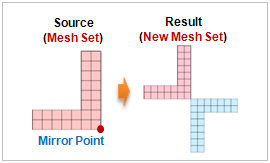 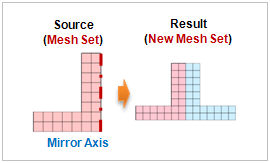
<Mirror point> <Mirror
axis>
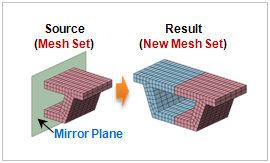
<Mirror plane>
Mirror Type
[Point]
: Directly select the mirror point or input the coordinates.
[Axis]
: Select the mirror axis on the GCS or define an arbitrary
vector axis that connects the start and end points.
[Plane]
: Select the mirror plane or define an arbitrary plane
that passes 3 points.
Copy Prestress for 1D Elements
If
the anchor is modeled as a 1D element and the prestress
load is entered, the load information is also copied when
copying the anchor. |


 Mirror a node,
element or mesh set and move/copy. If a section shape
is symmetrical, model only half and use the mirror (copy)
function to easily model the whole section.
Mirror a node,
element or mesh set and move/copy. If a section shape
is symmetrical, model only half and use the mirror (copy)
function to easily model the whole section.