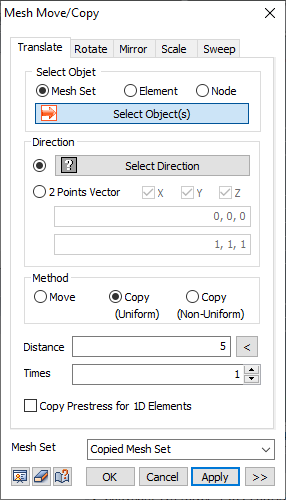
Select
the node, element or mesh set to move (or copy) and define
the direction.
Direction
Select
the move/copy direction with respect to the GCS or the
direction of a vector that connects 2 arbitrary points.
For the 2 points vector function, select (deselect) a
particular coordinate axis and select only the directional
comp1nt of a vector defined by a start and end point.
Method
Move
the position of the selected element or copy and move
the element to a specified or arbitrary distance.
[Move]
Directly
input the move distance or using the 2 points vector function,
automatically calculate the actual move distance with
reference to the start and end points. Select the  button to check the automatically
calculated distance. button to check the automatically
calculated distance.
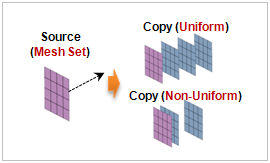
[Copy
(Uniform)]
Specify
the copy distance and number of copies. Entering a negative
value copies the object in the opposite direction to the
set direction.
[Copy
(Non-Uniform)]
The
length can be listed using a comma (,) or as number@length
for continuously repeated moves (copies).
For
example, entering 10@3 creates 10 elements with a move
length of 3 each and entering 2,3,4 creates 3 elements,
each with a move/copy length of 2,3 and 4.
Copy Prestress for 1D Elements
If
the anchor is modeled as a 1D element and the prestress
load is entered, the load information is also copied when
copying the anchor. |


 Move/copy a node,
element or mesh set. It is useful for moving the element
position or copying the same element to a specified distance.
Move/copy a node,
element or mesh set. It is useful for moving the element
position or copying the same element to a specified distance.