|
 Property setting for no results Property setting for no results
Specify the display settings for no result entities.
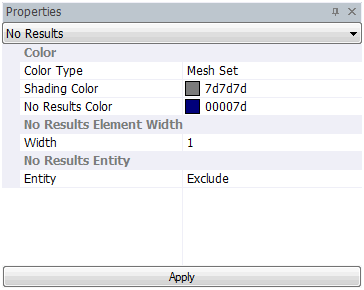
Color Type
Determine whether to display the specified color of the no result entity as a mesh set or user defined. When using the user defined method, the set shading color or no result color is displayed on the screen, depending on the display mode.
No Result Element Width
When displaying the no result entity as a wireframe, specify the wireframe width.
No Result Entity
-
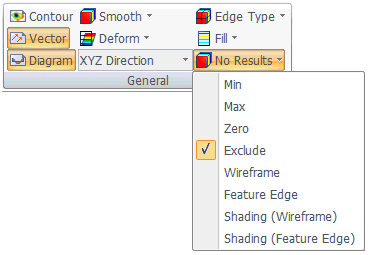
Minimum value: Display a no result entity as the minimum result value in the contour process.
-
Maximum value: Display a no result entity as the maximum result value in the contour process.
-
Zero value: Display a no result entity as 0 in the contour process.
-
Exclude: Exclude a no result entity from the contour process.
-
Wireframe: Display the no result entity as a wireframe on the screen during the contour process.
-
Feature edge: Display the no result entity as a feature edge on the screen during the contour process.
-
Shading (Wireframe): Display the no result entity as a ‘shading’ that includes a wireframe on the screen during the contour process.
-
Shading (Feature edge): Display the no result entity as a ‘shading’ that includes a feature edge on the screen during the contour process.
|


 Determine the representation method for a target object with no results.