
For the Perspective view function,
the checking positions need to be checked directly using
a mouse, but to automatically simulate it along a particular
guideline, the 'Flight simulation' function can be used.
The guideline can be selected
from a line or repeating line(wire), and the model interior
can be checked along the selected line. This function
is available for both before/after analysis.
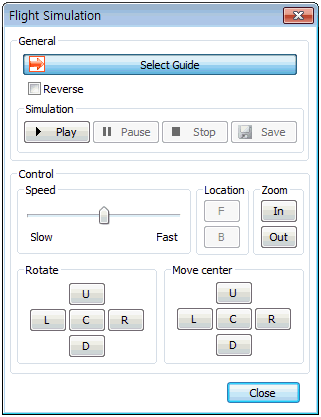
Select the guideline. Directly
draw the path in the model interior, or select a sub-shape
line of an existing geometry shape.
Selecting the line instantly
displays an arrow in the processing direction, and the
direction can be changed using the opposite direction
option.
The simulation operates using
Start, Stop, End buttons and selecting the Record button
saves the simulation as a video file.
Control
Control the process speed
using a scroll bar.
In particular, the (Progress/Rewind)
button is activated at the Stop state and the model interior
results can be checked by moving back and forth along
the guide line. The currently viewed model can also be
zoomed in/out.
Rotate
The view perspective can be
rotated Left/Right/Top/Bottom as it moves along the guideline
and can be moved (offset) with respect to the guideline.
Hence, the information can still be checked when the guideline
position is different from the target position by using
the rotate/move operations.
All buttons during the flight
simulation can be used as the following shortcut keys,
and can be checked from the Tooltips of each button.
Shortcut
Key List |
A |
View
left |
D |
View right |
S |
View
bottom |
W |
View
top |
1 |
Rotate to original position |
← |
Move
center to the left |
→ |
Move
center to the right |
↑ |
Move center to the top |
↓ |
Move
center to the bottom |
2 |
Move center to original
position |
R |
Proceed
from stop state(Only available at Stop state) |
F |
Rewind from stop state(Only
available at Stop state) |
|


 The Perspective
view function from the View toolset below can be used
to check the interior information and results of a 3D
model.
The Perspective
view function from the View toolset below can be used
to check the interior information and results of a 3D
model.