|
The FFA provides the following 3 types of time varying load input methods for the convenience of the user:
1) Method of saving the frequently used time varying load as a file and importing
2) Method of calling up the time varying load from the database
3) Direct user input method
The earthquake load input is only supported for the value obtained by dividing the time history acceleration by the gravitational acceleration.
1. Method of saving the frequently used time varying load as a file and importing
[Import]
Used to import a time varying load from an existing data. The data format is '*.sgs' or '*.thd' and the file is created in the following format:
|
*SGSw
|
States that this file is in the data format of the FEA NX automatic earthquake data extraction module "Seismic Data Generator".
|
|
*TITLE, Elcentro 1940, N-S Component
|
-
|
|
*X-AXIS, Second
|
-
|
|
*Y-AXIS, Normalized Acceleration
|
-
|
|
*UNIT&TYPE, GRAV, ACCEL
|
-
|
|
*FLAGS, 0, 0
|
-
|
|
*DATA
|
-
|
|
1.00000E-010, 3.50102E-001
|
-
|
|
5.00000E-002, 3.82861E-001
|
-
|
|
1.00000E-001, 5.08226E-001
|
-
|
|
1.50000E-001, 5.17459E-001
|
-
|
|
:
|
-
|
<Table. 'fn.sgs' file format>
|
Selective item
|
** Annotation– Can be entered anywhere
|
|
-
|
*UNIT, M , N - Length : MM, CM, M, INCH, FEET, GRAV 가능
|
| |
*Load : KG, TON, KN, LBF, KIP
|
|
-
|
*TYPE, ACCEL - ACCEL, FORCE, MOMENT 가능
|
|
Essential item
|
*Data
|
|
-
|
X1 , Y1 (X : Time, Y : Time Function)
|
|
-
|
X2 , Y2
|
|
-
|
X3 , Y3
|
|
-
|
:
|
<Table. 'fn.thd' file format –: User input>
2. Method of calling up the time varying load from the FEA NX database
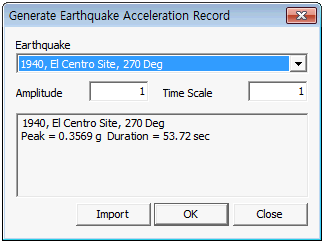
[Earthquake wave]
Create a time varying load by importing various earthquake data from the database. There are a total of 32 types of earthquake acceleration in the DB.
3. Direct user input method
Construct the time varying load by directly entering the time and the corresponding time varying load value in the left input column on the dialog box.
|


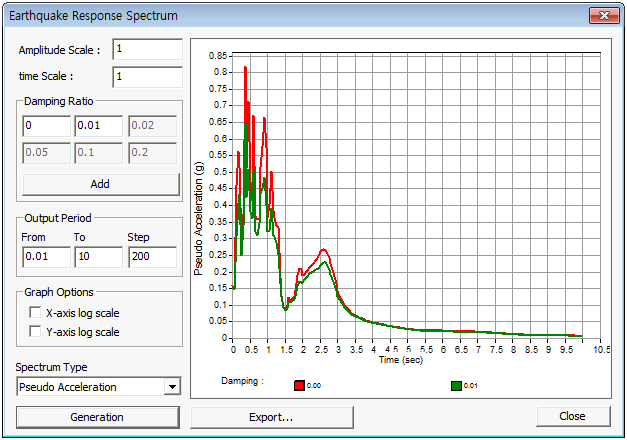
 Calculate and display the graph of the earthquake response spectrum using the earthquake wave data in the database or from the user defined earthquake wave data. Input the damping ratio. To output multiple damping ratio graphs simultaneously, click the [Add] button. Input the period range and spacing of graph output for the result stage. Select the spectrum type. Check the X-axis log scale and Y-axis log scale item to change the X-axis, Y-axis of the spectrum to a log scale.